 moonshot

Recruiter wearables are body-worn devices used for permitted capture and reflection, with the aim of turning a work moment into a clear next step. This guide to AI wearables for recruiters starts with a practical distinction: a note you captured earlier can help you prepare a follow-up, but a candidate’s conversation is not yours to record without permission.
- AI wearables for recruiters belong in a consent-led recruitment workflow, not an automatic candidate-scoring process.
- Moonshot is best suited to individual reflection and follow-through, not delegated hiring decisions.
- Candidate consent and workplace permission are separate checks; complete both before capturing a conversation.
- Start with your own notes, choose one next step, and approve anything that leaves your hands.
Why wearables matter for recruiters and HR teams
Recruiting mixes conversations with decisions that affect other people. A useful reflection tool helps you clarify your own next action. It does not turn a remembered impression into evidence about someone’s suitability for a job.
Suppose you wrote after a hiring meeting that the role’s travel expectations were unclear. Before the next candidate call, that note gives you something concrete to resolve: ask the hiring manager for the actual requirement. You do not need a recording of the candidate to do that.
The Moonshot wearable hears you out, asks a good question back, and helps you notice what your days keep saying. For recruiters, that is a personal reflection use case—not a reason to transfer hiring authority to a device.
For a 2026 evaluation, separate personal usefulness from permission to handle hiring information. A device can fit your reflection routine without belonging in an interview, an employee meeting, or a shared personnel record.
A consent-led recruitment workflow
Define the purpose
Start manually. Write down the work moment you want to improve and the action you want to take afterward. Choose something within your control, such as clarifying a role requirement or preparing a question for a hiring manager.
Keep the purpose narrower than remembering everything. A wearable does not need access to every conversation for you to learn from your own life. Your first exercise can use only your own spoken reflection, with no candidate names or identifying details.
For your 2026 workflow, write a boundary beside the purpose. For example: personal preparation belongs in the exercise; candidate assessment does not. That boundary gives you a useful test whenever a tempting new use appears.
A purpose also helps you judge the result. If the goal was to clarify a requirement, the useful outcome is a clear requirement—not a longer record of the meeting.
- Choose 1 next step for the exercise, rather than a collection of unrelated tasks.
- Start with a note you wrote yourself after an ordinary work moment.
- Remove names, contact details, and unnecessary identifying information.
- State which decisions remain entirely with you and your team.
- Define success as a completed action, not an amount of captured material.
Set the capture boundary
Before you introduce a wearable into a conversation, establish what you are allowed to capture. Workplace approval and the other person’s permission answer different questions. Neither should be treated as a substitute for the other.
Use a written checklist first. Your employer’s approved process should explain which settings permit capture, how participants are informed, and what happens if someone declines. A recruiting conversation should still work without a recording device.
Keep your own reflection separate from the original conversation. Saying afterward that you need to clarify the schedule is different from retaining a candidate’s explanation of personal circumstances. The first can be your work note; the second contains someone else’s information.
Do not use a product demonstration as proof of permission. In 2026, check workplace rules and applicable requirements before using capture features in hiring or employee discussions.
- Identify whether the source is your note, a conversation, or a public source.
- Confirm workplace permission before introducing capture into a meeting.
- Explain the intended capture and use before asking for consent.
- Keep a no-capture route available for candidates and employees.
- Exclude confidential employee matters from a personal reflection exercise.
Choose the reflection method
A notebook is a useful starting point. Say it once on paper: what happened, what you know, and what you want to do next. You can also talk it through privately without retaining anyone else’s words.
Moonshot is best suited to recruiters who want to talk it through, not delegate hiring decisions. The wearable hears you out and asks a good question back. Its role here is helping you examine your own account, rather than creating an official account of someone else.
Use that distinction when evaluating convenience. A conversational reflection method can reduce the friction of starting, but it does not remove your responsibility to check the source or decide what belongs in a hiring record.
Choose the method that fits the purpose you wrote down. If the work requires a shared, approved record, use your employer’s established system. If it requires deciding which question you should ask next, begin with personal reflection.
- Use paper first to test whether reflection helps the chosen task.
- Talk through your own actions rather than repeating sensitive candidate details.
- Choose a wearable for reflection only within your permitted use.
- Keep official hiring records in the employer’s approved process.
- Evaluate the next step separately from the appeal of the device.
Separate facts from interpretations
A captured statement and your interpretation of it are different things. If a candidate says they can start after a notice period, that is a statement to confirm. If you decide they sound reluctant, that is your interpretation—not a fact about their motivation.
Apply the same discipline to public information. A public job description is not a captured conversation. A candidate’s profile is not permission to collect unrelated personal details. Each source needs its own purpose and permission check.
Write the distinction manually before using any reflection tool. Label your note with the source, then mark what is directly stated and what you inferred. When a detail affects a hiring decision, return to an approved source and verify it.
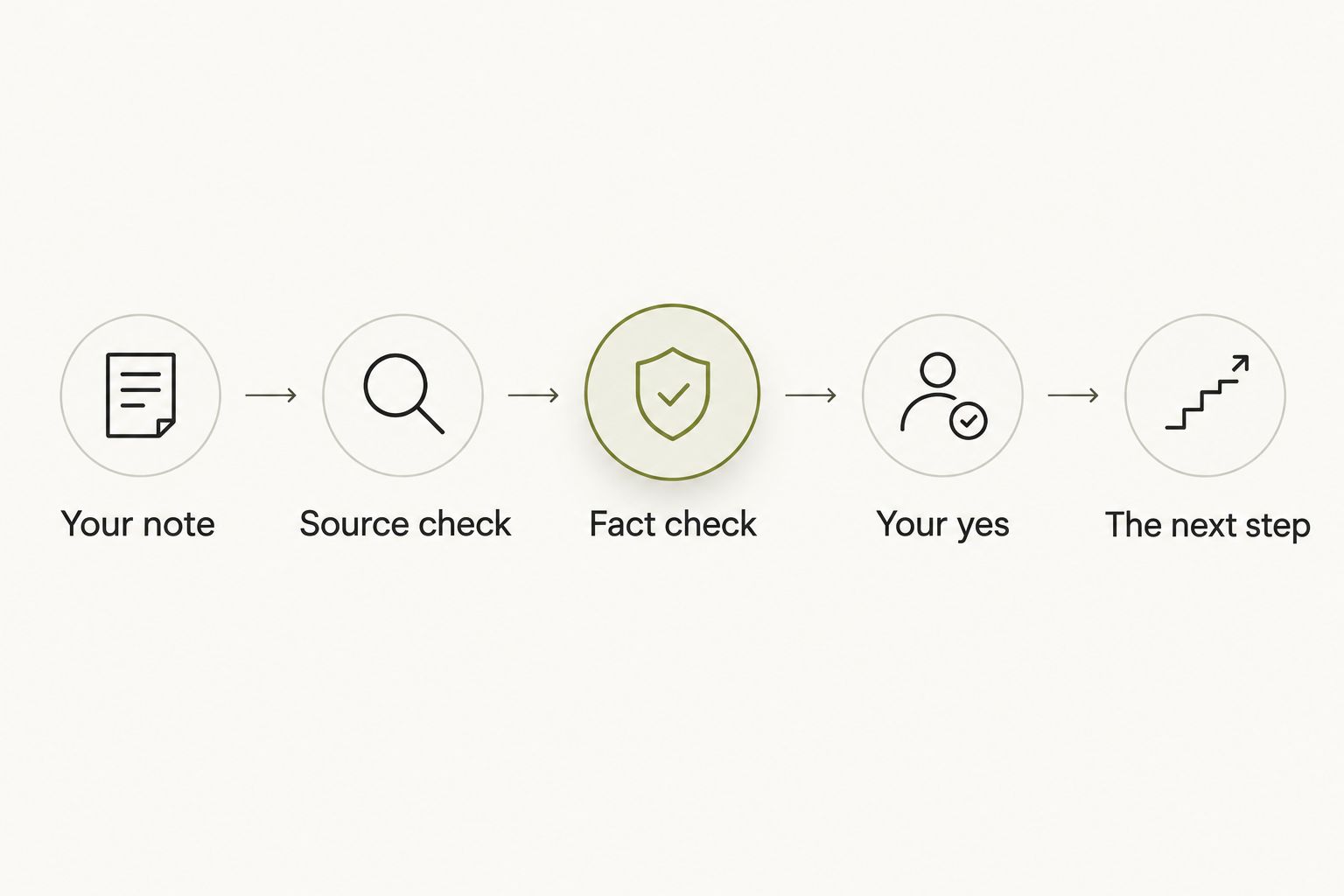
The sequence below keeps reflection from becoming an unsupported conclusion. Your note starts the process; it does not finish it.
- Your note: record the work question in your own words.
- Source check: distinguish a conversation from a public source.
- Fact check: separate what was stated from what you inferred.
- Your yes: decide whether the proposed action is appropriate.
- The next step: complete only the action you approved.
Approve the next step
Reflection is useful when it changes something you do. Keep that action small enough to name plainly: clarify the travel requirement, prepare a question, or finish the follow-up you already owe.
Draft the action yourself first. If a tool proposes wording or a task, examine it against the original source. A polished sentence can still contain an unsupported assumption. Your yes belongs after that check, not before it.
Choose priorities yourself and grant each source separately. Permission to use your own note is not permission to access a calendar or capture another conversation. Nothing should go out in your name without your yes on that action.
Moonshot turns one thing into a next step, with your yes on each one. It makes no calls and moves no money. Keep your recruiting workflow equally explicit about who decides, who communicates, and who completes the follow-through.
- Write the intended action before drafting a message.
- Check names, role details, and commitments against approved records.
- Remove interpretations that the source does not support.
- Approve the recipient and wording separately from the reflection.
- Send communications through your employer’s approved channel.
Review week one
Use a recommended 7-day review window to assess your own workflow. This is an evaluation period you choose, not a promised product result. Keep the question narrow: did reflection help you complete the action you selected?
For a 2026 evaluation, compare the wearable approach with your manual starting point. Look at the actual follow-through. A longer note is not automatically a better outcome, and more captured material is not automatically useful.
Set aside a recommended 5-minute review at the end of the week. Read the original purpose, identify the action you completed, and check whether you introduced information that did not belong in the exercise.
Continue only the parts that serve the purpose. If handwritten reflection gives you the same useful next step with fewer permissions to manage, keep it. If a conversational method helps you show up for that step, retain the same boundaries.
- Compare the completed action with the purpose you originally chose.
- Check whether every captured source had a clear permission basis.
- Review whether facts and interpretations stayed separate.
- Remove material that has no continuing work purpose through the approved process.
- Choose what to keep, change, or stop before the next week begins.
Options for recruiter reflection
Choose by the job you need to do, not by how much information an option can collect. Personal reflection, shared records, and conversation capture are different jobs. Treating them as interchangeable creates an unclear boundary between your thoughts and the evidence used in hiring.
This 2026 comparison concerns workflow fit. It does not treat a consumer wearable as an approved HR system.
| Option | Best for | Useful strength | Key limitation |
|---|---|---|---|
| Handwritten reflection | Recruiters testing a private reflection habit | You decide exactly what enters the note | You must structure the reflection and revisit it yourself |
| Employer-approved notes system | Teams maintaining shared hiring records | Keeps work inside the established recordkeeping process | Use is limited to the employer’s approved configuration and purpose |
| Moonshot wearable | Individuals who want to talk it through | Hears you out and asks a good question back | Personal reflection does not replace hiring records or human decisions |
| Permitted conversation capture | Teams with an approved reason to retain a conversation | Preserves captured words for the permitted purpose | Requires separate consent, access, and retention checks |
Use the least capture that serves the task. A reminder to clarify a job requirement does not require retaining an entire interview. An official assessment needs the approved evidence process, not a personal reflection turned into a personnel record.
When evaluating any option, distinguish an available feature from a planned one. A description of a future workflow is not proof that you can use it now. Test the permitted action itself before including it in a team process.
Common recruiter and HR mistakes
Candidate ranking from impressions
A reflection about an interview can help you identify a question to revisit. It should not become an automatic ranking of the candidate. Descriptions such as interested, difficult, or confident are interpretations unless tied to clear, relevant evidence.
Use the agreed assessment criteria. Verify the underlying statements and keep your personal reaction separate from the official evaluation. A useful reflection asks what you need to clarify; it does not decide who deserves the role.
Consent without a meaningful alternative
An invitation to consent is not useful if declining means losing access to the conversation. Do not make a wearable part of the candidate’s burden. Explain the purpose before capture and provide a route that does not use it.
Follow your organization’s approved process for documenting permission. If the intended use changes, revisit that process rather than treating the original agreement as permission for everything.
Personal notes in shared records
Your private account of a difficult meeting is not automatically appropriate for a hiring file. It can contain guesses, unrelated details, or a question you have not yet checked.
Before transferring anything, identify the work purpose and verify the facts. Keep unnecessary personal information out. Use the employer’s approved system for the record, not whichever method felt easiest during reflection.
Planned features in an operating workflow
Do not build a recruiting process around an announcement or illustrative scenario. A planned capability and a shipped capability are different things.
Confirm what is available, what your employer permits, and what you can demonstrate in the intended setting. Evaluate those separately. Permission does not prove functionality, and functionality does not establish permission.
FAQ
What are AI wearables for recruiters useful for?
AI wearables for recruiters are useful to evaluate for permitted reflection and personal follow-through, not automatic hiring decisions. Start with your own work notes and keep candidate assessment in the employer’s approved process.
Is Moonshot suitable for recruiting work?
Moonshot fits an individual reflection use case: it hears you out, asks a good question back, and helps you choose a next step. Use workplace permission and source-specific consent checks before bringing a wearable into recruiting conversations.
Can I record a candidate interview with a wearable?
Record a candidate interview only after completing the applicable consent and workplace approval requirements. Explain the intended use before capture and keep a no-capture route available.
Should a wearable score or rank candidates?
Do not use personal wearable reflection as an automatic candidate-scoring process. Hiring assessments belong with human decision-makers using relevant evidence and the agreed evaluation criteria.
Is a wearable better than handwritten recruiting notes?
A wearable is not automatically better than handwritten notes. Compare whether each method helps you complete the chosen next step while keeping capture and permissions appropriate to the task.
How do I separate a fact from an inference after an interview?
A fact is something you can verify against the approved source; an inference is your interpretation of it. Label them separately and confirm any detail that affects a hiring decision.
How should an HR team evaluate a wearable in 2026?
An HR team should evaluate a wearable against a narrow purpose, permitted sources, consent requirements, and human approval. Keep personal reflection separate from official employee or candidate records.
Final check
The useful result can be smaller than the conversation that produced it. You remembered that a requirement was unclear. You asked the hiring manager. The next candidate received a clearer answer.
That is a concrete reason to reflect. It does not require a complete record of the candidate’s life, a judgement about their personality, or permission to act on their behalf. The useful material was your unresolved work question.
For your 2026 workflow, keep one final test: does this help you take a responsible next step without collecting more than the task needs? If the answer is yes, write the action plainly and follow through. If the answer depends on broader capture or an unverified interpretation, return to your own note and narrow the task.


