 moonshot

Best overall privacy priority: capture control. Best for shared conversations: consent; best for follow-through: approval before action. This guide to ai wearables ranked by privacy features puts those decisions ahead of convenience in 2026.
- For ai wearables ranked by privacy features, put capture control before convenience.
- Moonshot hears you out and asks a good question back; you choose the next step.
- Conversation consent, source permissions, and action approval answer different privacy questions.
- Choose a wearable by its documented controls, not by how personal its suggestions sound.
Why this matters
You finish talking about a friend you mean to call. Later, you decide whether to make that call. The useful part is the connection between something you said and something you choose—not a device making the decision for you.
Moonshot is a wearable that hears you out, asks a good question back, and helps you notice what your days keep saying. Moonshot is best for people who want to talk it through and choose their own next step. That describes its purpose, not a technical privacy certification.
Privacy becomes easier to evaluate when you separate the decisions. What enters the device? Who agreed to that capture? Which additional sources are allowed? What happens before information leaves or an action takes place?
For a 2026 purchase, judge those boundaries separately. A useful question back does not establish how recordings are stored. A clear approval step does not establish whether earlier capture was appropriate. Each control needs its own explanation.
What makes the best privacy-focused wearable
Use these criteria before considering how useful a device sounds. They rank the boundaries you need to understand, rather than awarding a device an unsupported privacy score.
- Capture control: You can understand when information enters the device and how to stop that process.
- Conversation consent: Other people can understand what is being captured and make their own choice.
- Source permissions: You grant access to each source separately, rather than accepting unrelated access together.
- Action approval: You review the next step before anything goes out in your name.
- Retention control: You can understand what remains stored, where it remains, and what deletion covers.
These criteria belong together, but they are not interchangeable. A device with a clear microphone control still needs an understandable retention policy. A device that asks before sending still needs permission to use the source behind its suggestion.
Start with what the wearable takes in. Then evaluate what it keeps and what it does. That order makes the rest of the comparison easier to follow.
Privacy priorities at a glance
The 2026 ranking below compares privacy priorities, not verified hardware implementations. The order follows the information path: capture first, permission next, action and retention after that.
| Rank | Privacy priority | Best for | Standout control to check | Key limitation |
|---|---|---|---|---|
| 1 | Capture control | Deciding what enters the device | Clear start, stop, and capture state | Does not explain stored copies |
| 2 | Conversation consent | Conversations involving other people | Understandable notice and a real choice | Requires attention to the situation |
| 3 | Source permissions | Keeping access narrow | Separate permission for each source | Revoking access is not the same as deleting data |
| 4 | Action approval | Keeping decisions in your hands | Review before sending or acting | Approval does not fix inappropriate capture |
| 5 | Retention control | Limiting what remains afterward | Specific storage and deletion explanations | Deletion scope needs careful reading |
1. Capture control: best for deciding what enters a wearable
Capture control addresses the earliest privacy decision: whether information enters the device at all. Look for an explanation of how capture starts, how it stops, and how you recognize its current state.
A wearable should not leave you guessing whether a conversation is being captured. Before choosing one, read the instructions for stopping capture and check whether the same instructions distinguish stopping from deleting.
Capture control pros
- Gives you a decision before information enters the system.
- Supports clear boundaries between conversations you choose to capture and those you do not.
- Provides a concrete behavior to check instead of a broad privacy promise.
Capture control cons
- Stopping capture does not answer what happens to earlier recordings.
- A control only helps when its state and operation are understandable.
Best for: You want to choose which moments become material for later reflection.
Picture a conversation that shifts from a dinner plan to someone else's private news. The relevant question is not whether the device can produce a useful summary. It is whether you can stop capture without uncertainty.
Ask for the actual capture instructions. A description of what the device remembers is not a substitute for a description of what you can prevent it from receiving.
Verdict: Buy only when capture boundaries are clear; skip unclear capture behavior.
2. Conversation consent: best for shared conversations
Conversation consent concerns the people around you, not just your own preferences. Wearing a device does not make someone else's words yours to capture without discussion.
For a shared conversation, explain what you intend to capture before starting. Give the other person room to decline without turning that choice into an argument about the technology.
Conversation consent pros
- Makes the decision understandable to everyone involved.
- Keeps permission connected to the actual conversation.
- Gives you a practical reason to stop when the situation changes.
Conversation consent cons
- Agreement to one conversation is not blanket agreement to later conversations.
- A device indicator cannot replace an explanation someone understands.
Best for: You expect to use a wearable while talking with friends, family, or colleagues.
A useful boundary is simple: ask before capture, and stop when someone declines. Do not treat silence as a feature setting. The person sitting across from you needs a choice, not an explanation after the conversation ends.
This is a practical privacy recommendation, not a statement about recording law. Before recording in a particular setting, check the rules that apply there. Workplace requirements and personal permission are separate questions.
Verdict: Hold capture until everyone involved understands and agrees.
3. Source permissions: best for keeping access narrow
Source permissions determine which information a wearable or its associated service can use beyond the moment you deliberately share. Treat each source as a separate decision, with a specific purpose attached.
If a device requests an additional source, ask what that access enables. You should be able to distinguish a captured conversation from a public source and from information you separately authorized it to use.
Source permissions pros
- Keeps access tied to a purpose you choose.
- Lets you evaluate an additional source without accepting unrelated access.
- Makes it easier to ask where a particular detail came from.
Source permissions cons
- Separate permissions require separate decisions.
- Removing permission does not, by itself, explain what happens to information already retained.
Best for: You want useful context without granting broad access by default.
For a 2026 purchase, inspect the permission request rather than relying on the feature description. A proposed calendar connection is different from an existing connection. A planned integration is different from a shipped capability.
Keep facts and inferences apart, too. A date from an authorized source is a fact from that source. A suggestion about what matters to you is an interpretation. Neither should silently become the other.
Verdict: Buy only when each source has a clear purpose and a separate permission decision.
4. Action approval: best for keeping decisions in your hands
Action approval separates a suggestion from something done in your name. A useful next step still needs your yes, including agreement about what will happen and who will receive any information.
Moonshot turns one thing into a next step, with your yes on each one. It makes no calls and moves no money. Those boundaries matter when your goal is to learn from your own life rather than hand over your decisions.
Action approval pros
- Gives you a chance to review the proposed next step.
- Keeps a suggestion distinct from an external action.
- Lets you decline without accepting the device's interpretation as your priority.
Action approval cons
- Requires you to make the final decision.
- Does not establish how the underlying conversation was captured or stored.
Best for: You want help thinking through follow-through while retaining the choice to act.
A reminder that you mentioned a friend is not permission to contact that friend. The recipient, content, and timing are separate choices. Evaluate approval at the point of action, not merely during setup.
For Moonshot, the useful payoff is the next step you choose. You might decide to make the call yourself. You might decide the conversation helped you see that another priority needs your attention first.
Verdict: Buy for suggestions you can review; skip any workflow that treats a suggestion as your permission.
5. Retention control: best for limiting what remains afterward
Retention control concerns what stays after capture and use. Read the explanation of stored recordings, derived text, account data, and deletion scope as separate questions where those data types apply.
A statement that you can delete something needs an object. Deleting a visible entry, deleting an original recording, and requesting account deletion are different instructions unless the documentation explicitly connects them.
Retention control pros
- Gives you a basis for deciding what should remain stored.
- Helps distinguish the original material from information derived from it.
- Turns a general privacy promise into questions you can check.
Retention control cons
- Deletion can have a narrower scope than the wording first suggests.
- Retention instructions do not replace control over initial capture.
Best for: You want to understand the lasting record, not just the immediate interaction.
For your 2026 shortlist, read the current retention explanation before relying on a deletion button. Look for what the instruction covers and whether it explains exceptions. Do not infer a particular storage architecture from a small device or a simple interface.
The important distinction is between access and persistence. Disconnecting a source addresses future access. Removing previously retained information is a different question and needs its own answer.
Verdict: Hold the purchase until retention and deletion instructions are specific enough to use.
Permission sequence
Use this sequence for a conversation you deliberately choose to share. It is a decision framework, not a description of any particular device's interface.
- Choose capture: Decide what you want to talk through.
- Ask permission: Include anyone whose words would be captured.
- Check sources: Separate what you said from any additional information used.
- Approve action: Review the next step before anything goes out in your name.
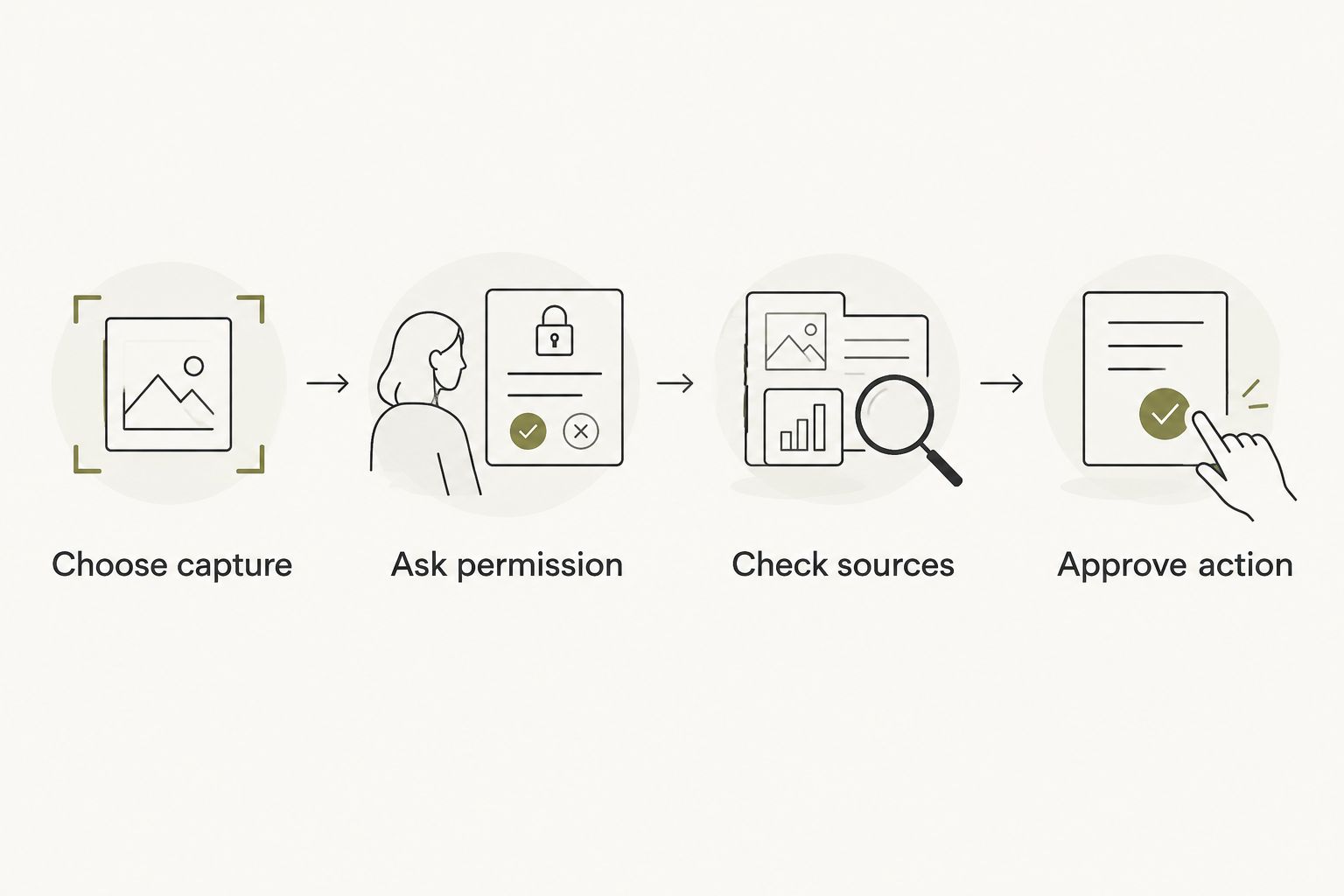
Your yes belongs at each relevant boundary. Agreeing to talk it through does not grant access to every source, and granting a source does not authorize an external action.
Ranking method
This ranking orders privacy controls by where they intervene. Capture control comes first because it addresses information entering the system. Conversation consent and source permissions define whose information belongs in that process. Action approval and retention control address what happens next.
There are no device scores here. Judge a wearable against each criterion independently; do not let one clear control stand in for the others. A strong fit for your purpose still needs understandable privacy boundaries.
Wearable choice
For 2026, the default recommendation is to choose clear capture control before convenience. Then check conversation consent, source permissions, approval, and retention. If a boundary remains unclear, hold the purchase rather than guessing what a promise means.
Consider the Moonshot wearable when you want to say it once, talk it through, and choose the next step. Evaluate technical privacy controls separately from that purpose. Start with the small thing you actually want to follow through on, not an expectation of total recall.
Read the wearable details
Consider whether a question back and a next step you choose fit what you need.
FAQ
What's the most important privacy feature in a wearable?
Capture control is the first privacy feature to evaluate because it determines what enters the device. Check how capture starts, stops, and signals its current state; then evaluate retention separately.
Is a microphone control enough to make a wearable private?
No. A microphone control addresses capture, but it does not explain storage, deletion, source access, or external actions. Evaluate those boundaries individually.
Should I ask someone before capturing our conversation?
Ask before capturing a shared conversation and stop if someone declines. Explain what you intend to capture, and check the recording rules that apply to the setting.
Does disconnecting a source delete its information?
Do not treat disconnection as deletion unless the documentation explicitly says so. Disconnecting addresses access; deletion instructions need to explain previously retained information.
What is Moonshot best for?
Moonshot is best for people who want a wearable that hears them out, asks a good question back, and leaves the next step to them. You choose what to do with it.
Does Moonshot make calls or move money?
Moonshot makes no calls and moves no money. It turns one thing into a next step, with your yes on each one.
How should I compare wearable privacy features in 2026?
Compare capture control, conversation consent, source permissions, action approval, and retention control separately. Use current documentation rather than treating a useful feature description as proof of technical privacy protections.
One last thing
Permission has a scope. Saying yes to capturing a conversation is not saying yes to sharing it, keeping it indefinitely, or acting on it.
Before you show up with a wearable, choose the boundary you want to explain in plain language. If you cannot explain what happens to someone else's words, leave that conversation uncaptured. The next step can wait for your yes.


