 moonshot

Instead of rewriting something you already talked through, use a review-and-publish routine: turn the relevant detail into a short recap, approve the exact wording, and send it yourself to the intended work channel. If you want automatic sharing, keep preparation separate from permission; this guide describes an approval-first workflow, not a device integration or unattended posting setup.
- Moonshot hears you out and helps turn one thing into a next step, with your yes.
- Prepare the recap separately from publishing it; approve the exact message and destination before sharing.
- Share the work decision, not the surrounding personal conversation.
- Treat a revised recap as a new approval, not permission to keep publishing.
Why this matters
A conversation has more context than a work channel needs. You might mention a project delay alongside a private explanation, an unfinished idea, or something another person said. Sending the whole account turns a useful update into unnecessary disclosure.
The useful payoff is smaller. Earlier, you talked through a delayed handoff. Later, when your team needs an update, you have a clear next step to share without repeating everything around it.
Moonshot is best for people who want to talk it through before choosing their next step. Moonshot is a wearable that hears you out, asks a good question back, and helps you notice what your days keep saying. You choose what to do with it.
For a 2026 sharing workflow, make the boundary explicit: material you choose to discuss is not automatically material you choose to publish. A useful recap carries the decision across that boundary, not the entire conversation.
Before you start
- Choose a permitted source. Use material you are entitled to share. Distinguish your own account from a captured conversation involving someone else, and obtain any permissions your workplace requires.
- Confirm publishing access. You need access to the intended work channel and a place to prepare the draft. Follow your workplace rules for sensitive information before moving material between tools.
- Separate preparation from sending. The non-obvious gotcha is approval scope: agreeing to create a recap is not agreeing to publish it. Check the exact wording, destination, and sender identity before anything goes out.
Start with 1 recap, 1 destination, and 1 approved message. These are setup boundaries, not product limits. Keeping the first handoff small makes it easier to see whether the message says what you intended.
Do not begin with your entire day. Pick a work-relevant moment with a clear outcome, such as a decision you made or a question you need someone to answer. Leave unrelated personal details outside the draft.
Source boundary
The source boundary answers a simple question: what information belongs in this recap? Set it before writing. Otherwise, a concise summary can still contain information that never belonged in the work channel.
Source selection
- Choose the moment. Identify the conversation or personal account you want to use. Do not treat every available source as permission to include it.
- Name the purpose. Write a short purpose statement, such as updating the team about a handoff. Use that purpose to decide what stays out.
- Separate source types. Mark whether a detail came from a captured conversation, your own recollection, or a public source. Do not present these as interchangeable evidence.
- Separate facts from interpretations. A missed handoff is an event. Your explanation for why it happened is an interpretation unless you have confirmed it.
- Remove unrelated details. Exclude private explanations, side conversations, and other people's information that the recipient does not need.
Expected result: you have a narrow source set and a stated reason for sharing it. Each included detail serves that purpose.
For example, suppose you talked through why a draft was not ready. The shareable fact might be that the draft still needs your review. A guess about a colleague's priorities does not become a fact because it appears in a recap.
Keep this distinction in a 2026 source note if you maintain one: what happened, what you think it means, and what you have decided to do. That note is your working record, not a requirement to publish all three parts.
Source permissions
Grant each source separately wherever a workflow requests access. Permission to use one conversation does not establish permission to use your calendar, another person's messages, or a different account.
This guide does not require those additional sources. If you can write the update from the material you have already selected, stop there. More context is not a reason to widen access.
Recap draft
A work recap should help someone understand the decision and respond to it. It should not ask them to reconstruct your conversation. Write for the recipient's next action.
Draft structure
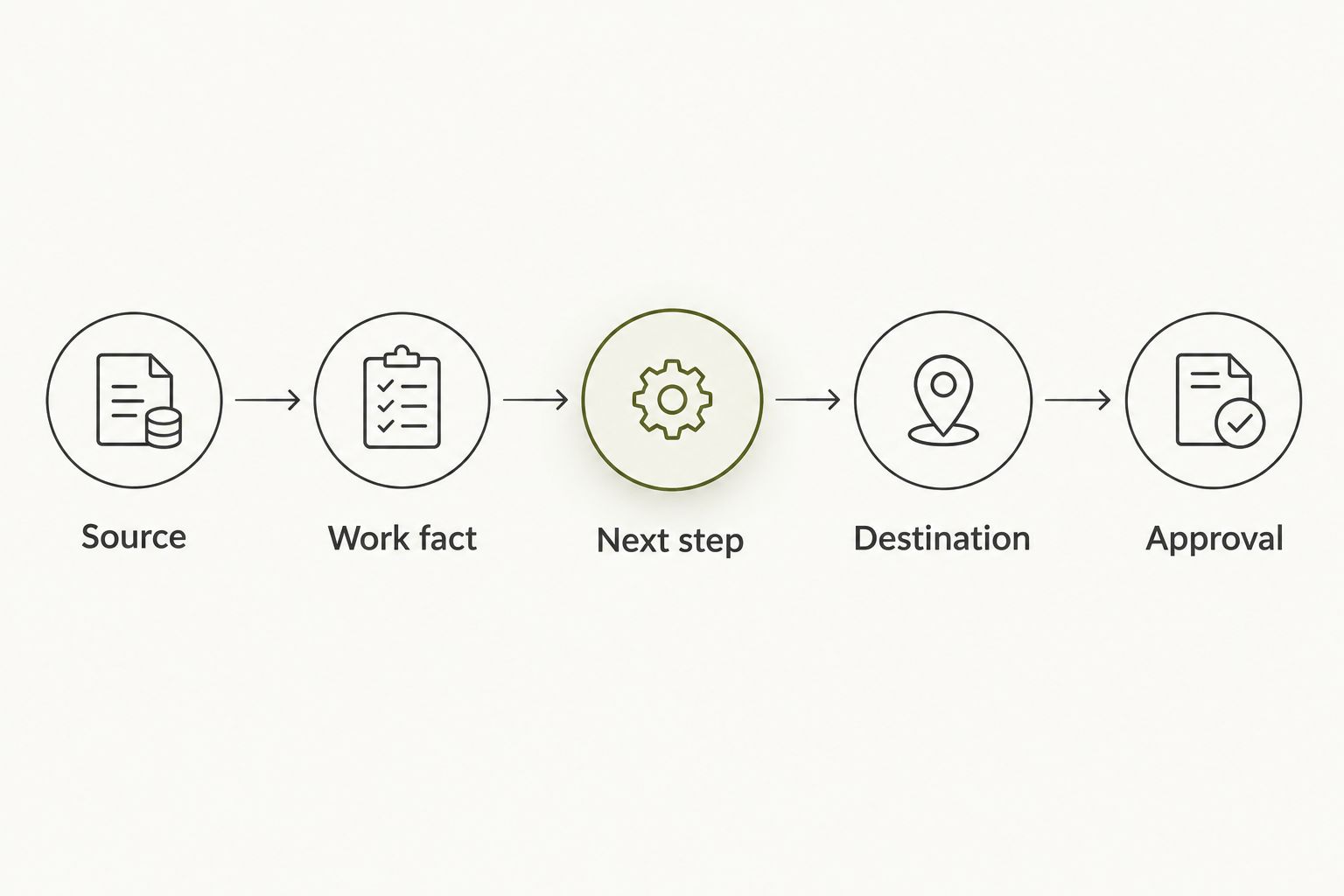
Use the following labels in your own working document. They are template fields, not device settings or integration controls.
- Source: record where the relevant information came from. Keep private source material out of the outgoing message.
- Work fact: state what the recipient needs to know. Use plain language and distinguish a confirmed event from an assumption.
- Next step: name the action you have chosen. If you have not chosen an action, state the question you want answered instead.
- Destination: identify the intended channel and audience. Check that the audience is appropriate for the information.
- Approval: leave this unset until you have reviewed the finished message. A draft is not an approved message.
Expected result: you have a short outgoing message and a separate working record. The outgoing message contains only the information needed for the handoff.
An illustrative draft is: The handoff draft still needs my review. I will review it before sending it to the team. Please keep using the current version until I confirm the replacement.
That example states a work fact and a chosen next step. It does not include the surrounding conversation or claim that anyone else's intention has been established. Change the wording to match what is actually true in your situation.
Draft review
Read the recap without the source beside it. Ask whether the recipient can tell what happened, what remains unresolved, and what you are asking them to do.
Then check it against the source. Remove any certainty you added during compression. If the original account says a decision is still open, the recap must not turn it into a settled instruction.
For your 2026 draft template, keep the source record separate from the outgoing text. That separation lets you check accuracy without making private context part of the message.
Approval and publishing
Approval belongs immediately before publishing. An early yes to discussing a topic does not cover every later version of a message about it.
Final approval
- Read the exact message. Review the text that will be sent, not a description of what the recap is supposed to say.
- Confirm the destination. Check the channel and its audience. A message suitable for a project group is not automatically suitable for a wider workplace audience.
- Confirm the commitment. Look for promises, assigned work, or decisions made in your name. Keep only the commitments you have chosen.
- Give your yes. Approve this wording for this destination. If the draft changes afterward, review it again.
- Publish deliberately. Send the approved message yourself using your workplace's normal process. Check the posted text before treating the handoff as complete.
Expected result: the recipient sees the wording you approved in the destination you selected. Your draft and your published message match.
Keep your yes attached to the message, not just the topic. This is the central rule for any future sharing setup you consider. A workflow that sends changed wording under an old approval does not preserve that boundary.
Moonshot turns one thing into a next step with your yes on each one. Keep the same distinction in your work recap: choosing what matters is separate from choosing what leaves the private conversation.
Publishing choices
| Workflow | Best for | Advantage | Limitation |
|---|---|---|---|
| Manual publishing after review | A first recap or a sensitive handoff | You inspect the exact message and destination immediately before sending | You must complete the publishing step yourself |
| Prepared draft with separate approval | Repeating the same recap structure | A reusable template reduces repeated writing | Preparation still needs a source check and fresh approval |
| Unattended publishing | No recommendation for this guide | Removes the manual sending step | Does not provide message-by-message approval unless a separate gate is enforced |
Choose manual publishing for the first handoff. Move to a prepared-draft routine only after the source and approval boundaries are clear. Do not confuse a repeatable format with permission to send every future message.
Revised recap
A second useful workflow handles changes after the original recap. Treat a revision as a new message decision, not a standing instruction to keep updating the channel.
- Identify the changed fact. Establish what is different from the original update. Do not rewrite the whole conversation when only one detail changed.
- Check the original commitment. Decide whether the earlier next step still applies. Do not silently carry an outdated commitment into the new draft.
- Write the correction or update. State the changed information clearly enough that the recipient can distinguish it from the earlier message.
- Review the destination again. The revised information still needs an appropriate audience, even when the original message was approved.
- Approve and publish the revision. Check the exact revised wording before sending it. Use your workplace's normal correction process.
Expected result: the recipient can see what changed and which next step now applies. Nothing new goes out under approval granted to the old wording.
In a 2026 revision record, keep the original message and the approved correction distinguishable. This is a recordkeeping recommendation, not a claim about automatic version history or device syncing.
Troubleshooting
Private detail in the draft
Remove the detail from the outgoing message, then check whether the remaining text still explains the work issue. If the detail is essential but not appropriate for the channel, choose a suitable audience rather than disguising it with vague wording.
An interpretation presented as a fact
Return to the selected source. Replace an unsupported explanation with the confirmed event, or clearly identify it as your interpretation. Do not assign another person's motive just to make the recap read more smoothly.
An unclear next step
Replace a broad intention with the action you have actually chosen. If you are not ready to choose, share the unresolved question instead. A recap should not manufacture a commitment merely to look complete.
A changed draft after approval
Stop before publishing and review the revised wording. Changes to the destination, commitment, or included information require another decision. Keep approval tied to the final message rather than the first draft.
A recap in the wrong destination
Use your workplace's correction and removal process, then contact the appropriate person if sensitive information was involved. Do not assume deletion resolves every consequence. Before the next handoff, confirm the audience as well as the channel name.
Workflow scope
Expand the routine by improving the handoff, not by collecting more of your life. Add a source note when accuracy is difficult to check. Add a clear question when you need a decision. Keep each addition tied to a recipient's need.
For 2026, review your template whenever its purpose changes. A project update and an account of a personal conversation need different boundaries, even if both fit into a short message.
The trade-off is deliberate. Moonshot's wearable approach gives you a way to talk it through; it does not remove your responsibility to choose what becomes a work update. The approval-first routine adds a publishing step, but preserves your choice over the message.
FAQ
Can I automatically send a wearable recap to my work channel?
Use an approval-first workflow rather than treating recap preparation as permission to send. This guide describes manual publishing after review, not a shipped device integration or unattended posting feature.
What is Moonshot best for in this workflow?
Moonshot is best for people who want to talk it through before choosing their next step. It hears you out and asks a good question back; you decide what belongs in a work update.
Do I need to share the entire conversation?
No. Share the work-relevant fact and the next step you have chosen, leaving unrelated personal context out of the outgoing message.
Does approving a source also approve publishing?
No. Source permission and message approval are separate decisions. Review the exact outgoing wording and its destination before sending.
What should I do when the recap changes?
Review and approve the revised message before publishing it. Approval for the original wording does not cover a changed commitment, destination, or disclosure.
How do I stop a recap from sounding more certain than the conversation?
Check each statement against the selected source and separate confirmed facts from interpretations. Keep unresolved decisions unresolved rather than writing them as instructions.
Does Moonshot make calls or move money as part of follow-through?
No. Moonshot makes no calls and moves no money. Keep the next step separate from any action you have not personally chosen and approved.
One last thing
A good recap can omit most of what made the conversation useful. The work happened when you talked it through; the message only needs to carry the part someone else needs.
Say it once in your own words before publishing. If you would not say that sentence to that audience, revise the recap. Learn from your own life, then choose how to show up for the next step.


