 moonshot

Instead of rewriting a conversation from memory, use a review-first workflow to turn what you captured into one clear next step. This 2026 guide shows how to separate an actual commitment from a passing idea, choose what belongs on your list, and keep every action subject to your yes.
- For the search ‘turn conversations into to-do lists ai wearable,’ start with reviewed commitments, not automatic execution.
- Moonshot hears you out, asks a good question back, and turns one thing into a next step with your yes.
- Keep captured conversations separate from public sources, and distinguish stated facts from your interpretation.
- A useful to-do names an action you chose; a passing idea does not become a commitment automatically.
Why this matters
A conversation does not arrive as a clean task list. You mention something you want to do, something someone else agreed to do, and something you are still considering. Put all of those on your list and you have changed the meaning of the conversation.
The useful shortcut is less rewriting, not less choice. Suppose you said earlier that you meant to call a friend. When you return to that captured moment, the useful outcome is deciding whether to make the call—not creating a chain of reminders you never requested.
Moonshot is a wearable that hears you out and asks a good question back. Moonshot is best for people who want to talk it through and choose one next step. Its described approach keeps your yes attached to that step; it makes no calls and moves no money.
For your 2026 workflow, separate drafting from doing. A proposed task can help you remember what you meant. It does not establish that you agreed to do it, that someone else agreed, or that anything should go out in your name.
Before you start
- Choose a permitted source. Start with something you deliberately captured or wrote down. Get permission before capturing another person's conversation, and grant access to each source separately rather than treating one permission as permission for everything.
- Choose a destination you control. Have a task list or written note ready. This guide describes a review process, not a particular account connection, export format, or screen sequence. Use only the functions actually available to you.
- Check the commitment before the wording. The non-obvious gotcha is that an accurate summary can still produce the wrong task. Someone mentioning an idea is not the same as someone agreeing to act on it.
You do not need to make a long list to prove the workflow works. Start with 1 conversation and 1 chosen task. That makes it easier to check whether the task preserves what you actually said.
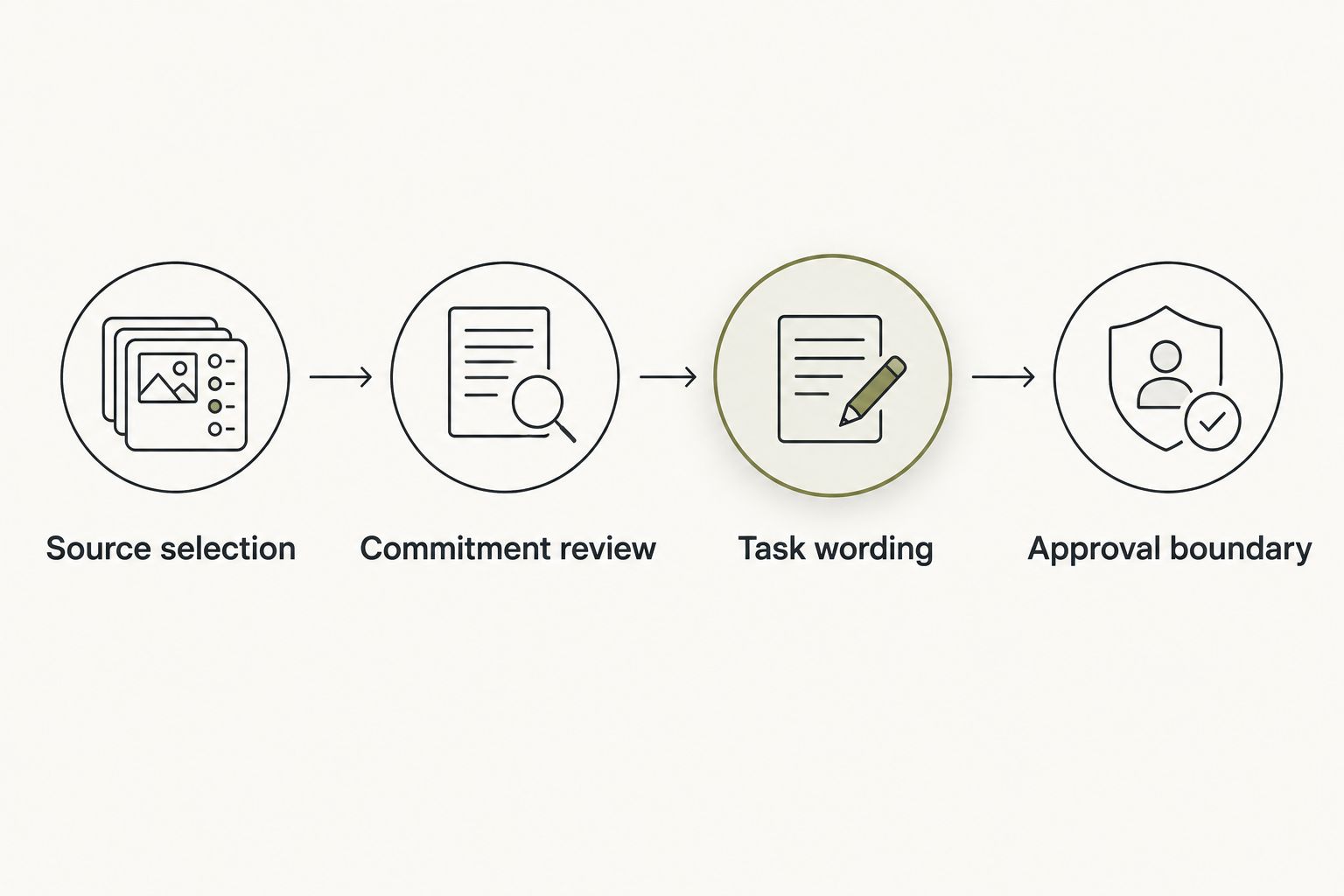
Source selection
The first configuration unit is the source. Before extracting tasks, decide what material belongs in this attempt and what does not. A useful source is a specific moment you can return to, not a vague collection of everything you have discussed.
- Pick the moment. Choose the captured conversation or note that contains the thing you want to consider. Keep unrelated conversations outside this attempt.
- Identify the source. Write whether the material is a captured conversation, your own note, or a public source. Do not blend those categories into an unnamed summary.
- Check permission. Confirm that you intended to use this material for the task. If another person is involved, handle their participation and information with care.
- Keep the relevant words nearby. Retain enough context to check the proposed action against the original meaning. A task alone can hide the difference between a suggestion and a promise.
Expected result: you can point to the exact material behind the proposed task and explain why you chose it.
For example, a public article about staying in touch is not evidence that you promised to call someone. Your own captured statement that you want to make that call is a different source. Neither source, by itself, supplies a deadline you did not choose.
Commitment review
The next configuration unit is the commitment. Review what the conversation supports before deciding how the task should read. Keep facts and interpretations separate, even when an interpretation sounds reasonable.
- Find the stated intention. Look for something you actually said you wanted or agreed to do. Do not turn every interesting topic into work.
- Name the owner. Establish whether the next step belongs to you, another person, or nobody yet. Another person's commitment does not automatically become your task.
- Check the timing. Preserve a stated date or occasion. If none was agreed, leave timing undecided until you choose it.
- Mark the interpretation. If the proposed task adds meaning beyond the conversation, label that addition as your interpretation. Then decide whether you accept it.
- Choose the priority. Ask whether this is the thing you want to act on now. Importance belongs to your decision, not to how often a topic appears.
Use 2 review passes: first check what was said, then check what you want to do. These are workflow instructions, not a claim about a device's performance.
Expected result: you have either a supported commitment, a question to resolve, or an idea you deliberately leave off the list.
A sentence such as “We should catch up” leaves several things undecided. Who will reach out? Is this an intention or a polite suggestion? The next step can be to make that choice, rather than pretending the conversation already settled it.
Task wording
The third configuration unit is the task itself. Make the wording useful at the moment you return to it. A long summary explains the conversation; a short action tells you what you chose to do.
- Start with an action. Write the thing you will do, such as call, ask, read, or decide. Avoid a topic label that forces you to reconstruct the conversation later.
- Add the necessary context. Include who or what the action concerns, but leave out personal details that the task does not need.
- Keep the scope small. Turn the chosen intention into one next step. Do not silently expand a call into planning an entire visit.
- Separate uncertainty. Put an unresolved question beside the task rather than hiding it inside a confident instruction.
- Read the task back. Ask whether you would recognize this as your decision without rereading the whole source.
These are writing steps for your task list, not names of product controls. A simple note can use your own headings: Action, Context, and Open question.
Expected result: the task tells you what to do next without inventing an agreement, deadline, or wider project.
Suppose the captured moment was about a friend you meant to call. “Call my friend” is an action, but it leaves the subject unclear. “Call my friend about the visit we discussed” retains useful context without pretending a date has been agreed.
For a first attempt in 2026, keep the task narrow enough that you can tell whether you followed through. You are learning whether the process helps you return to an intention, not trying to turn an entire day into assignments.
Approval boundary
The final configuration unit is approval. Saving a task, scheduling something, and sending something are different decisions. Keep those boundaries visible instead of treating them as one continuous action.
- Approve the wording. Confirm that the proposed task represents what you chose. Edit or discard it if it does not.
- Place it deliberately. Put the approved task in the destination you selected. Do not assume a connection exists between your wearable and your task list.
- Choose timing separately. Add a date only when you decide one or when the conversation explicitly established it.
- Review outward actions separately. Nothing should go out in your name without your yes. A task about contacting someone is not permission to send a message.
- Check the saved result. Read the final task where you expect to find it. Confirm that its wording and timing still match your choice.
Expected result: you have an approved task in a known place, with no implied permission for additional actions.
Moonshot's wearable approach centers on turning one thing into a next step with your yes. The benefit is a prompt to choose; the limit is equally important: it makes no calls and moves no money. You still decide how to show up.
Updated conversations
A second workflow starts when a later conversation changes an earlier intention. Perhaps you planned to call about a visit, then learned that the visit is no longer happening. Creating another task without checking the old one leaves conflicting instructions.
Use the same source and approval checks, but compare the new meaning with the existing task before adding anything. For your 2026 list, a changed intention should trigger a fresh decision—not an assumption that both versions remain valid.
| Workflow | Best for | Benefit | Limit |
|---|---|---|---|
| New commitment | A newly chosen action | Gives the intention a clear place to live | Needs review so ideas do not become obligations |
| Updated commitment | A change to an existing action | Keeps the task aligned with your current choice | Requires comparison with the earlier task |
- Find the existing task that concerns the same intention.
- Compare what changed: the action, the owner, the timing, or whether you still want it.
- Choose to revise, keep, or remove the task.
- Approve the revised wording before using it.
Expected result: one current task reflects your current decision. You do not need to preserve an outdated obligation merely because you once considered it.
Troubleshooting
Too many tasks
Fix: review intentions before extracting more actions. Remove items that are questions, observations, or someone else's responsibilities. If several tasks point to the same outcome, choose the next step rather than keeping every possible step.
Wrong owner
Fix: return to the source and identify who agreed to act. A conversation about a shared plan does not assign every action to you. Keep ownership unresolved until you have a clear agreement or make your own choice.
Invented deadline
Fix: remove the date and choose timing separately. “Soon” and “sometime” do not establish a calendar date. If timing matters, ask the necessary question instead of letting a neat-looking task conceal uncertainty.
Missing context
Fix: add the smallest detail that makes the task recognizable. A task such as “follow up” gives you no useful starting point. Name the subject, but do not copy a whole private conversation into the task title.
Workflow choices
Expand the process by making the decisions clearer, not by adding more sources immediately. Use 3 checks before keeping a task: is it yours, does it preserve the conversation's meaning, and do you still want to do it?
You can also separate “decide” tasks from “do” tasks. If you have not chosen whether to make the call, the next step is the decision. Writing the call as settled creates pressure where there was only an open question.
Moonshot's invitation is to learn from your own life. Keep that practical: return to something you said, talk it through, and choose a piece of follow-through that matters to you. Leave the rest outside the list.
FAQ
How do I turn a conversation into a to-do list?
Start with a permitted captured conversation, identify a commitment, and write one action you choose. Review ownership and timing before saving the task.
Should every conversation automatically create tasks?
No. Conversations include ideas, questions, and other people's commitments, so task creation needs review rather than treating every statement as an instruction.
Who is Moonshot best for?
Moonshot is best for people who want to talk it through and choose one next step. It hears you out, asks a good question back, and keeps your yes attached to the next step.
Can a wearable connect directly to my task list?
Use a direct connection only when that function is explicitly available. Otherwise, place the approved task in your chosen list yourself; this workflow does not require a particular integration.
What should I do when a later conversation changes a task?
Compare the new conversation with the existing task before creating another item. Revise, keep, or remove the task according to your current choice, then approve the wording.
What is a sensible first workflow to try in 2026?
Start with one permitted conversation and one chosen task. Check the original meaning, approve the wording, and confirm that the saved task represents your decision.
Does approving a task also approve sending a message?
No. Approving a task and approving an outward action are separate decisions; nothing should go out in your name without your yes.
One last thing
A useful task can be a decision not to act. If returning to a conversation helps you realize that an idea is not yours to pursue, removing it is a valid result.
For your next 2026 attempt, say it once, review what you meant, and keep only the next step you choose. The point is not a longer list. It is a task you still recognize as your own when the moment to act arrives.


