 moonshot

Best overall: Google Pixel for general work tasks. Best for personal moments alongside work: Moonshot. Best for meeting notes: PLAUD NotePin. Best for hands-free visual help: Ray-Ban Meta glasses. This 2026 guide compares what each device does and where each one falls short.
- Google Pixel is the best AI assistant device for professionals who need help with varied daily tasks.
- Moonshot is best for personal moments and proactive tasks; confirm its fit with workplace rules before using it for work.
- PLAUD NotePin fits meeting capture. Ray-Ban Meta glasses fit hands-free visual help.
Why this matters
The best device for a meeting is not automatically the best device for your entire day. A wearable that captures moments, a recorder that turns speech into notes, glasses that respond to what you see, and a phone that handles varied requests solve different problems.
Choose the task before the device. In 2026, that distinction matters more than a broad AI label. Professional use also brings questions about recording permission, sensitive information and workplace-approved tools. Check those requirements before bringing any assistant into a meeting or client conversation.
What makes the best AI assistant device for professionals?
- Primary job: Does it help with the task you repeat, or only with an occasional novelty?
- Capture method: Decide whether you need audio notes, a visual viewpoint, personal context or a general-purpose phone.
- Action after capture: Distinguish between saving information, summarizing it and helping you act on it.
- Workplace fit: Check whether your employer or clients permit the device in the places you plan to use it.
- Practical trade-off: A device built around one task can be easier to choose for that task, but less useful outside it.
The 2026 picks at a glance
| Device | Best for | Standout capability | Key limitation |
|---|---|---|---|
| Google Pixel | General daily work tasks | Phone-based assistance across varied requests | Not a dedicated wearable recorder |
| Moonshot | Personal moments alongside work | Captures life moments and proactively handles tasks | Its stated audience is consumers, not workplace teams |
| PLAUD NotePin | Meeting notes | Wearable recording and AI-generated notes | Recording is not appropriate in every setting |
| Ray-Ban Meta glasses | Hands-free visual help | Camera and voice interaction from glasses | A visible camera changes where use is appropriate |
Each pick has a different job. Google Pixel is the default when you need one broadly useful device. Moonshot is the narrower choice when personal moments and proactive help matter more than a phone’s range of uses.
1. Google Pixel: best AI assistant device for general work tasks
Google Pixel is the most flexible choice here because it is a smartphone, not a device dedicated to one capture method. You can use phone-based assistance for varied questions and writing tasks while retaining the ordinary functions of a phone. For a professional who has not identified a single dominant use case, that range makes Pixel the default pick in 2026.
Google Pixel pros:
- Handles more than one type of everyday request.
- Does not require you to choose between a camera, a recorder and a separate general-purpose device for basic phone tasks.
- Fits a familiar phone-based workflow.
Google Pixel cons:
- It is not a purpose-built wearable for capturing moments throughout the day.
- Phone interaction is less suitable when you need your hands free.
- Its range of functions does not replace permission to record a conversation.
Best for: Professionals who want a general assistant and do not need a dedicated capture device.
Start here if your requests change from hour to hour. If nearly every request starts with recording a meeting or looking at something without holding a phone, choose the more focused device for that task instead.
Verdict: Buy if general daily assistance is your priority; hold if hands-free capture is the job you need to solve first.
2. Moonshot: best for personal moments alongside work
Moonshot is an AI-powered wearable offered for preorder. It is described as capturing life moments and proactively handling tasks for consumers. That makes it relevant to a professional’s life around work, but the description does not establish it as a meeting recorder or an employer-approved work tool.
Moonshot pros:
- Its stated purpose combines capturing moments with handling tasks.
- A wearable format suits someone seeking help beyond a phone interaction.
- Its consumer focus makes the intended use clear: personal life comes first.
Moonshot cons:
- Its stated consumer audience does not answer whether it meets your employer’s requirements.
- The supplied product description does not establish meeting-note, enterprise-management or workplace-integration capabilities.
- As a preorder, it is not the choice for someone who needs a device in hand immediately.
Best for: Professionals who want a consumer wearable for personal moments and proactive tasks, with work use decided separately.
Do not turn a personal-use description into a workplace promise. If your main need is meeting documentation, PLAUD NotePin has the clearer stated job. If you need an assistant for varied tasks on a device you already know how to use, Pixel remains the broader choice.
Verdict: Hold for work-specific use until you confirm workplace fit; consider the preorder for the personal use the device is described to serve.
3. PLAUD NotePin: best AI assistant device for meeting notes
PLAUD NotePin is a wearable AI note-taking device built around recording speech and producing notes. Its use case is narrower than Pixel’s: capture a conversation and work from the record afterward. That focus makes it the clearest pick here when meeting notes are the main job.
PLAUD NotePin pros:
- Has a defined role in conversation capture and note creation.
- Wearable use keeps the recording device separate from your phone.
- Makes sense when meetings, rather than varied daily requests, drive the purchase.
PLAUD NotePin cons:
- A meeting-focused device is less useful when recording is not allowed or appropriate.
- Generated notes still need human review before you rely on them for decisions or commitments.
- It is not a substitute for a general-purpose phone assistant.
Best for: Professionals whose recurring need is permitted meeting capture and follow-up notes.
Ask for permission where required, and follow your organization’s rules for confidential conversations. A clear note after a meeting is valuable only if the recording itself was appropriate and the resulting text is accurate.
Verdict: Buy for permitted meeting-note workflows; skip if your workplace rules rule out recording.
4. Ray-Ban Meta glasses: best for hands-free visual help
Ray-Ban Meta glasses combine a camera, microphones, speakers and Meta AI interaction in a glasses format. Their distinct advantage in this group is the viewpoint: you can ask for help about something in front of you without first framing the task as a phone-based request. That is a different need from preserving a meeting or capturing personal moments.
Ray-Ban Meta glasses pros:
- Keep your hands free for visual, on-the-move questions.
- Combine camera and voice interaction in one wearable format.
- Offer a clear use case when your task starts with what you can see.
Ray-Ban Meta glasses cons:
- A visible camera is unsuitable in some offices, meetings and private spaces.
- They are not the default choice for drafting, managing varied phone tasks or reviewing long notes.
- Their visual use case does not make them a dedicated meeting-note device.
Best for: Professionals who need hands-free help with visible surroundings where camera use is permitted.
Be specific about where you would wear them. If the places you work restrict cameras, their main distinction becomes harder to use. A phone is the better default when visual assistance is only an occasional need.
Verdict: Buy for permitted hands-free visual tasks; skip where camera restrictions block that use.
Capture versus action: choose your actual workflow
A device can help you capture information, help you act on it, or do some of both. The distinction is sharper than a list of assistant features: start with what enters the device, then name what you expect to happen next.
- Meeting notes: Choose PLAUD NotePin when permitted speech capture is the central task. Review the resulting notes before sharing them.
- Personal moments: Consider Moonshot when keeping life moments and getting proactive task help are your stated priorities. Treat workplace suitability as a separate decision.
- Hands-free view: Choose Ray-Ban Meta glasses when the question begins with something in front of you and camera use is allowed.
- General tasks: Choose Google Pixel when your requests vary and no single capture method dominates.
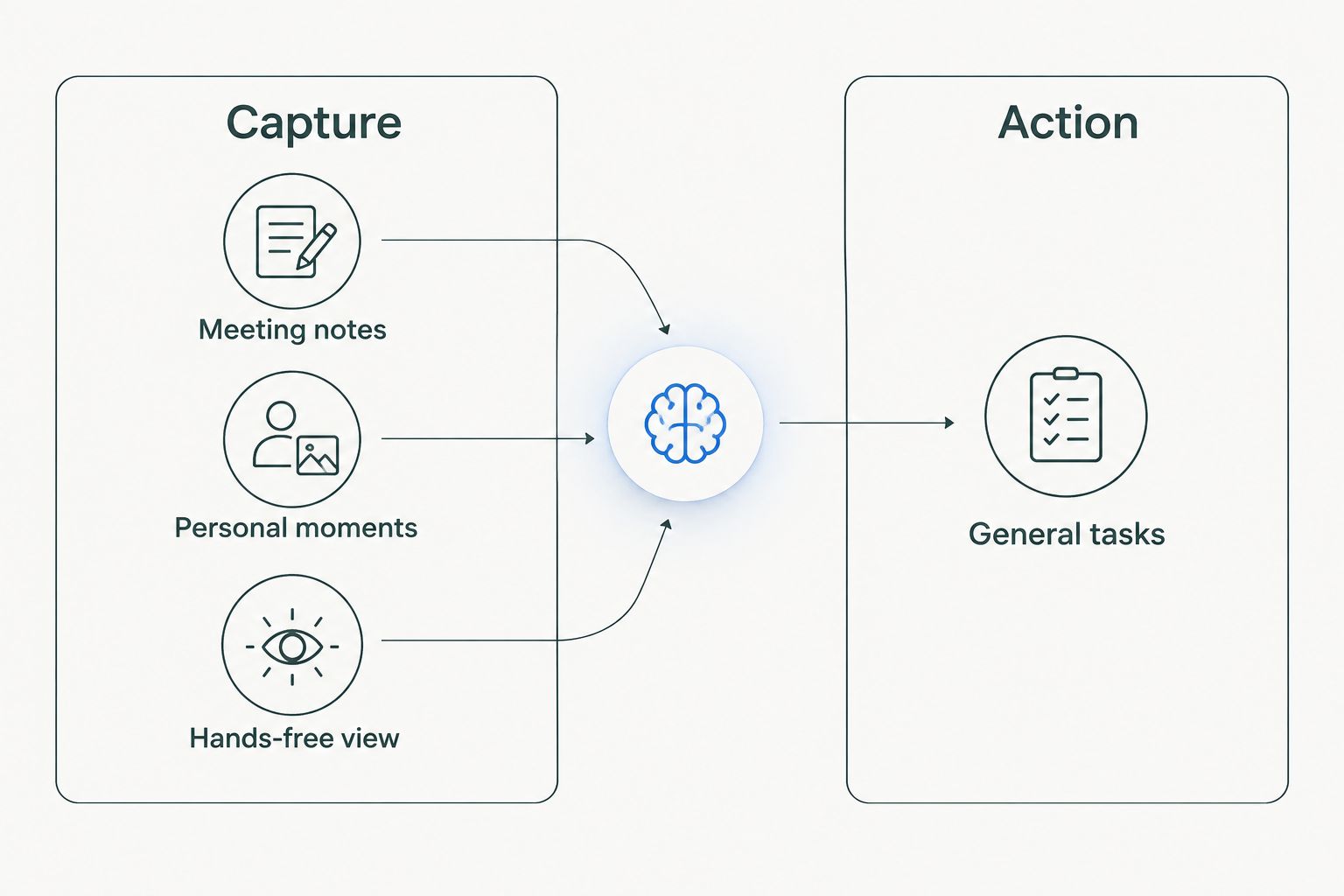
This is also the point to test your assumptions. If you mainly want better notes, do not buy glasses for their camera. If you mainly need help across unrelated tasks, do not make a dedicated recorder your only assistant.
How these devices were ranked
The order follows breadth of use first, then the clarity of each narrower job. Google Pixel takes the overall position because a phone addresses varied daily requests. The remaining picks each own a distinct use case: personal moments and tasks, meeting notes, or hands-free visual help.
This is a use-case ranking, not a claim that one device produces better answers than another in a measured test. The 2026 choice depends on what you need to do and what you are allowed to capture. No device earns a work recommendation simply by being wearable.
Which AI assistant device should you choose?
Choose Google Pixel if you want one device for varied professional tasks. Choose Moonshot if your interest centers on personal moments and proactive help, and make a separate decision about using it at work. Choose PLAUD NotePin for permitted meeting capture. Choose Ray-Ban Meta glasses for permitted hands-free visual assistance.
For an undecided reader in 2026, Google Pixel is the default. A focused wearable earns its place when you can name the recurring situation in which you would use it. If that situation involves other people’s words or images, settle the permission question before the purchase question.
FAQ
What is the best AI assistant device for professionals in 2026?
Google Pixel is the best general-purpose pick for professionals in 2026 because it supports varied phone-based tasks. Choose a focused wearable instead when meeting capture, personal moments or hands-free visual help is the main need.
Is Moonshot a workplace AI assistant?
Moonshot is described as a consumer wearable that captures life moments and proactively handles tasks. That description does not establish workplace approval or work-specific capabilities; check your organization’s requirements before using it for work.
Which AI assistant device is best for meeting notes?
PLAUD NotePin is the clearest meeting-note pick among these devices. Use it only where recording is permitted, and review generated notes before relying on them.
Are Ray-Ban Meta glasses better than a phone for work?
Ray-Ban Meta glasses are better suited to hands-free visual questions, while a phone is the stronger default for varied tasks. Camera rules determine whether glasses fit your workplace.
Should I choose a wearable or a smartphone assistant?
Choose a wearable when its specific capture method matches a recurring need. Choose a smartphone when your requests vary and you do not need a dedicated recorder or hands-free viewpoint.
Can I record a work meeting with an AI wearable?
Record a work meeting only when applicable rules and your organization allow it. Get the permissions your setting requires, and check any generated notes for accuracy.
Does a device that captures moments also write meeting notes?
No such capability should be assumed from a moments-focused description. Check the stated functions of the specific device before treating it as a meeting-note tool.
One last thing
The strongest 2026 shortlist begins with a sentence, not a device name: I need help with this recurring task. If you cannot finish that sentence, start with the general-purpose pick. If you can, choose the focused device whose stated job matches it.


