 moonshot

Best overall for formal meeting notes: a wearable recording workflow with consent and a reviewable transcript. Best for personal reflection: Moonshot. Best alternative when recording is inappropriate: handwritten notes. This 2026 guide separates a record of what was said from the question that helps you decide what to do next.
- The best AI wearables for meeting notes need a reviewable record, clear recording consent, and corrections before sharing.
- Moonshot is best suited to personal reflection: it hears you out and asks a good question back.
- A phone recorder is an alternative when you want an explicit recording session rather than a wearable.
- Handwritten notes suit meetings where recording is inappropriate; confirm decisions and responsibilities with participants.
Why this matters
A useful meeting record answers a narrow question: what did everyone agree to? Personal reflection answers another: what does that conversation mean for you? Buying a wearable for the second job does not establish that it can do the first.
For your 2026 shortlist, start with the output you need. A transcript, an agreed decision, and a question about your next step are different things. Choose the device or method around that distinction, not around the broad promise of remembering more.
Imagine leaving a conversation with a colleague. Earlier, you captured your own thought that you wanted to reconnect with someone. That thought gives you something concrete to talk through now: whether to make the call. It does not establish what the colleague said, agreed to, or promised.
Moonshot is best suited to people who want to talk it through and learn from their own life, rather than rely on a formal meeting transcript.
What makes the best wearable for meeting notes
Use these criteria before comparing devices. A wearable belongs on your meeting shortlist only when its documented functions match the record you need.
- Recording consent: You need a clear way to explain recording and obtain the permission required for the meeting.
- Reviewable evidence: If accurate wording matters, choose a workflow that lets you check the transcript against the captured conversation.
- Speaker clarity: Names attached to statements need checking. An uncertain speaker label should not become an assigned responsibility.
- Corrections and sharing: You need to correct a record before sending it, with a deliberate approval step before anything goes out in your name.
- Source boundaries: Keep captured conversation, outside information, and interpretation separate. A summary should not blur them together.
- Purpose fit: Decide whether you need meeting documentation or personal reflection. More capture does not resolve a mismatch between those jobs.
These are buying criteria, not claims that every wearable provides them. Check each requirement against the current product documentation and your workplace rules.
Meeting-note options at a glance
The ranking below separates distinct uses. The phone and handwritten options are alternatives to wearables, not wearable products. No option replaces agreement from the people in the meeting.
| Rank and option | Best for | Standout characteristic | Key limitation |
|---|---|---|---|
| 1. Wearable recording workflow | Reviewing a formal meeting record | A captured conversation can serve as the source for checking notes | Recording alone does not establish transcription, speaker identification, or accurate summaries |
| 2. Moonshot | Personal reflection after a conversation | Hears you out and asks a good question back | Personal reflection is not a substitute for agreed meeting minutes |
| 3. Phone recording workflow | Occasional, explicitly started recording sessions | Uses a phone rather than another wearable | The recording method still needs permission and a separate review process |
| 4. Handwritten meeting notes | Meetings where recording is inappropriate | Records selected decisions without an audio recording | Not a verbatim account; omissions and interpretation need checking |
1. Wearable recording workflow: best for formal meeting review
A wearable recorder captures audio when its recording function is deliberately used. For meeting notes, the useful part is not simply wearing it. It is having a source you can consult while checking the written record.
Choose this route when exact wording matters and participants permit recording. Evaluate the complete workflow, including any transcription method, rather than assuming the wearable supplies every part.
Wearable recording workflow pros:
- A captured conversation gives you a source for checking disputed wording.
- You can separate reviewing the discussion from writing the final notes.
- You can verify a proposed action against the conversation before assigning it.
Wearable recording workflow cons:
- Recording requires appropriate permission and workplace approval.
- Audio capture does not establish that transcription or speaker labels are included.
- A transcript still needs review before it becomes an agreed record.
Best for: Meetings where you need to check what was actually said, not just preserve your impression of it.
Before buying in 2026, ask to see the path from recording to corrected notes. Check whether you can identify an uncertain passage, resolve it, and keep the correction in the version you share. If that path is unclear, a feature list is not enough.
Verdict: Buy only when the documented recording and review workflow meets your meeting requirements.
2. Moonshot: best wearable for personal reflection
Moonshot is a wearable that hears you out, asks a good question back, and helps you notice what your days keep saying. You choose what to do with it. That makes the relevant use case personal reflection, not formal minute-taking.
After a meeting, you might want to talk through the idea you keep returning to or the friend you mean to call. The useful outcome is a next step you choose, with your yes—not an assumed record of everyone else's commitments.
Moonshot pros:
- Its stated purpose fits talking through your own experiences.
- A good question gives you something to consider beyond preserving words.
- You remain the person who chooses what to do next.
Moonshot cons:
- Reflection does not establish a verbatim account of a meeting.
- Your interpretation cannot substitute for another participant's agreement.
- This use case does not replace a required workplace documentation process.
Best for: People who want a wearable for reflecting on their own day and choosing the next step.
If your buying question is about meeting notes, keep the distinction visible. A conversation can leave you with something worth thinking about without producing a document suitable for distribution. Treat those as separate outcomes.
Verdict: Buy for the stated reflection use case; skip as a substitute for verified meeting minutes.
3. Phone recording workflow: best for occasional recording sessions
A phone recording workflow is a non-wearable alternative. You deliberately start an audio recording using a suitable method, then review it through a separate note-taking process.
This route suits someone whose recording need belongs to a particular meeting rather than their wider day. Check the functions of the method you choose; having a phone does not establish transcription, export, or speaker identification.
Phone recording workflow pros:
- You can define a specific recording session rather than adopt a wearable.
- The phone can hold the source recording for later review, subject to the method's functions.
- You can assess whether recording helps before deciding that you need another device.
Phone recording workflow cons:
- Placement and the meeting environment affect what the microphone captures.
- Recording does not automatically create corrected meeting notes.
- Workplace permission still applies, even when the hardware is familiar.
Best for: Occasional meetings where recording is allowed and you want an alternative to a wearable.
Make the recording explicit. Tell participants what you intend to capture, how you intend to use it, and who will receive the resulting notes. Do not assume that a phone on a table communicates permission or purpose.
Verdict: Buy no additional wearable until a phone-based workflow has been assessed against your requirements.
4. Handwritten notes: best when recording is inappropriate
Handwritten meeting notes capture what you select while listening. They are not a transcript. Their strength is a narrow, visible purpose: writing down the decisions and responsibilities the meeting needs to preserve.
Choose this route when recording is not permitted or when participants prefer not to be recorded. Confirm important wording during the conversation rather than filling gaps afterward.
Handwritten meeting notes pros:
- They do not require an audio recording.
- You can focus the record on decisions instead of every spoken sentence.
- You can read a proposed action back to its owner before the meeting ends.
Handwritten meeting notes cons:
- You select what to capture, so the record can omit relevant detail.
- Writing while listening divides your attention.
- Exact quotations are unreliable unless you captured and confirmed the wording.
Best for: Meetings where a selective, participant-checked written record is more appropriate than audio capture.
Keep observations separate from decisions. Someone raising a possibility is not the same as agreeing to do it. If you cannot confirm ownership, leave the responsibility unresolved rather than attaching a name.
Verdict: Buy no recording device for a meeting that should not be recorded; use checked written notes instead.
A meeting record you can trust
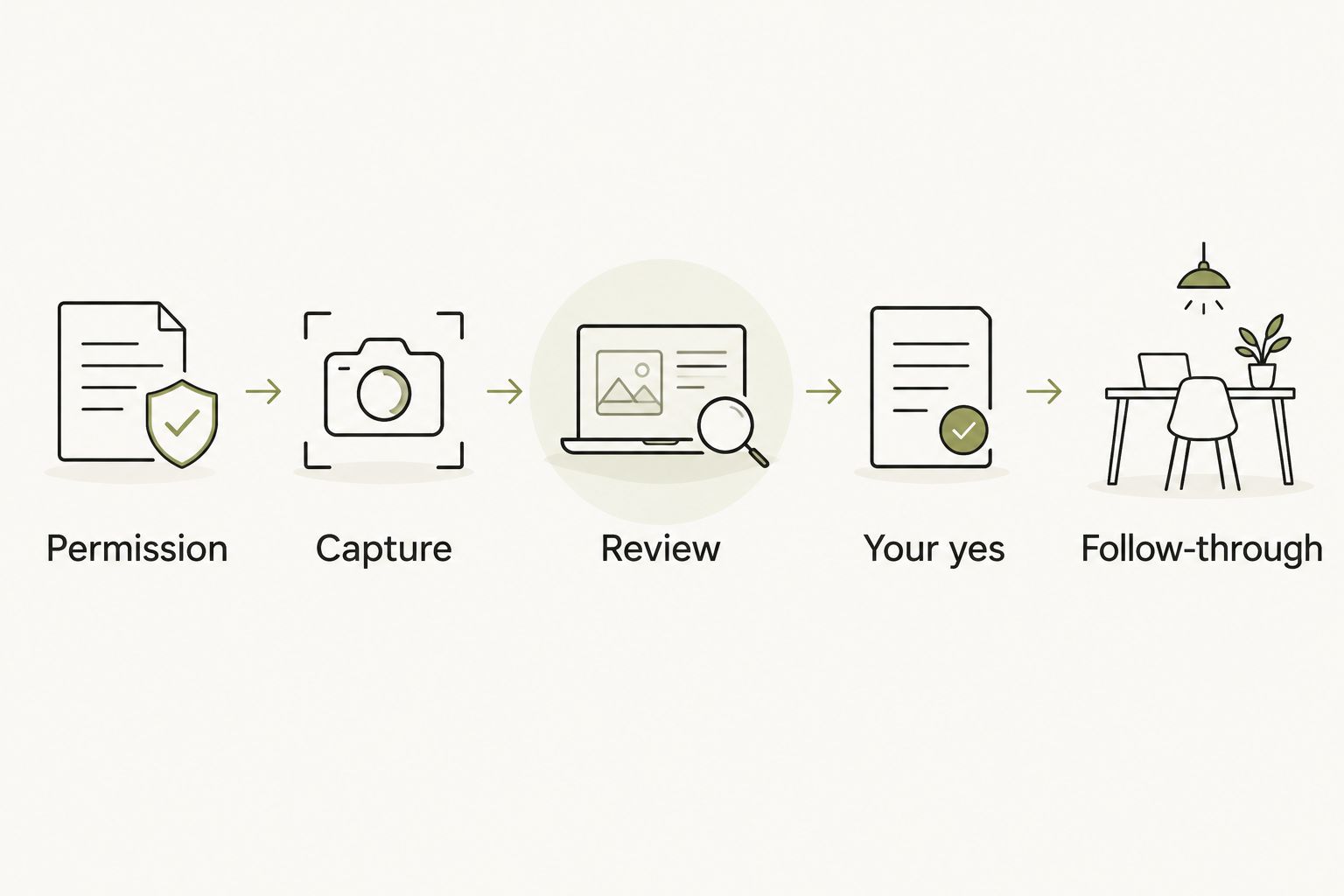
The best AI wearables for meeting notes in 2026 should support a process you can explain. Use this sequence when evaluating a recording workflow or improving a written one.
Permission
Agree on capture before it begins. Ask whether recording is permitted, what sources are allowed, and who can receive the notes. If someone declines, choose a permitted method rather than treating the objection as a technical problem.
Capture
Record only within the agreed scope. When writing notes, mark the difference between a direct statement and your interpretation. Do not silently add material from an outside source to the account of the meeting.
Review
Check the wording that matters. Pay particular attention to decisions, names, responsibilities, and dates. If the source does not resolve an uncertainty, ask the participant instead of turning an inference into a fact.
Your yes
Approve the version that will be shared. Keep a proposed action separate from an authorized action, and do not let a generated summary speak in your name without review.
Follow-through
Give the next step an agreed owner. A useful note describes what someone has accepted, not merely what a system or note-taker thinks should happen.
A purchase check that reveals the difference
Before committing to a wearable, arrange a permitted trial using a conversation whose decisions you can verify. Ask for a real example of the resulting record, not only a description of what the product is intended to do.
Inspect the output for a suggestion incorrectly presented as a decision. Then check whether a name has been attached to a responsibility without agreement. Those errors matter more than how polished the summary looks.
For a reflection wearable, use a different question: does the experience help you talk it through and choose your next step? Do not evaluate personal reflection as if it were transcription, or accept reflection as proof of meeting-note accuracy.
Separate functions available now from planned capabilities. Your 2026 purchase decision should rest on the documented experience you are choosing, not on a future feature used to fill a present requirement.
How the options are ranked
This 2026 ranking prioritizes purpose fit, recording permission, source checking, correction, and approval before sharing. It ranks approaches by their distinct jobs, rather than claiming an unsupported winner among named devices.
The wearable recording workflow leads for formal review because a source recording can support verification. Personal reflection, occasional phone recording, and handwritten notes each serve a different need. None earns a higher position merely by capturing more.
Which meeting-note option should you choose?
Choose a permitted, reviewable recording workflow when you need formal meeting documentation. Start with the required record, then select hardware whose current functions support it.
Choose Moonshot for wearable personal reflection when the useful outcome is to talk it through and decide what to do next. Choose handwritten notes when recording is inappropriate. A phone-based workflow belongs on the shortlist when your need is occasional rather than a reason to wear another device.
Explore the reflection use case
Consider whether talking it through fits your next step better than formal meeting documentation.
FAQ
What's the best wearable for meeting notes in 2026?
The best choice is a wearable whose documented recording and review functions match your meeting requirements. Confirm recording permission, access to the source, and corrections before sharing; a wearable's form alone does not establish those functions.
Is Moonshot a substitute for meeting transcription?
Moonshot's stated role is personal reflection, not a substitute for verified meeting transcription. It hears you out and asks a good question back; use a separately verified process when you need formal meeting minutes.
Do I need permission to record a meeting with a wearable?
Obtain the permission required by applicable law and workplace policy before recording. Explain the purpose and intended recipients, and use a permitted alternative if recording is declined.
Is a phone recorder better than a wearable for occasional meetings?
A phone recording workflow is an alternative when you want a specific recording session rather than a wearable. Compare the actual capture and review functions, not the shape of the device.
Can automatic meeting notes assign tasks for me?
A proposed task is not an agreed responsibility until the person accepts it. Review names and commitments, and approve anything that will be sent in your name.
What should I do when a transcript gets a decision wrong?
Check the decision against the captured conversation and confirm unresolved wording with participants. Correct the shared record rather than leaving an uncertain statement presented as fact.
What should I use when a meeting cannot be recorded?
Use a permitted written note-taking method and confirm the decisions with participants. Handwritten notes are selective, so distinguish confirmed commitments from your interpretation.
One last thing
For your 2026 shortlist, look for the moment where a possibility becomes a commitment. That is where a useful record needs the most care.
Before you leave the meeting, ask who has agreed to the next step. Then write that answer down. A device can help preserve a conversation; agreement still belongs to the people who show up.


