 moonshot

Yes, an AI wearable can work for people who are hard of hearing if you can read its useful output, notice its alerts, and control it without relying on sound. Capturing a conversation is not the same as making that conversation accessible while it happens. Before choosing a device in 2026, test the exact task you need help with: following speech now or returning to something later.
- Can an AI wearable work for people who are hard of hearing? Yes, when its output and controls are accessible.
- Live captions and later summaries serve different needs; a summary cannot replace access during a conversation.
- Moonshot hears you out; confirm hearing-access features separately before choosing its wearable.
- Test readable output, noticeable alerts, and correction controls before relying on a device.
Can an AI wearable work for people who are hard of hearing?
Yes, but judge the whole interaction, not just the microphone. A device that captures your words still needs a usable way to return information. If its questions or confirmations are available only as sound, that interaction depends on hearing.
Start with the situation you want to change. Following a discussion at a table requires something different from reviewing a thought you recorded earlier. The wearables for accessibility guide provides a related starting point; use the checks below to assess the particular device you are considering.
| Approach | Best for | Useful feature | Limitation to check |
|---|---|---|---|
| Live text during a conversation | Following speech as it happens | Readable speech output during the exchange | Timing, errors, and speaker identification need testing |
| A transcript or summary afterward | Returning to an earlier discussion | A written record you can review | It does not provide access during the original exchange |
| Spoken output with another accessible channel | People who prefer different formats in different situations | A choice of how to receive information | Confirm that the alternative includes questions, errors, and confirmations |
| Spoken output alone | People who can reliably hear that output | Information delivered without reading | It is unsuitable when the sound itself is inaccessible |
These are interaction types, not claims about any particular product. For a 2026 purchase, verify the current implementation rather than assuming that a category label guarantees access.
Why this matters
Imagine that you captured a thought earlier: you want to call a friend you have not spoken with lately. Later, you want to revisit that thought and decide what to say. Readable output could support that moment without requiring you to hear a spoken reply.
Now change the scene. Your friend is speaking across a noisy table, and you need to follow the conversation now. A summary delivered afterward addresses a different problem. It cannot give you the chance to ask a question at the moment you need to ask it.
Later recall and access in the moment are separate requirements. Choose the requirement first. Then check whether the device actually meets it.
Live conversation access
If your priority is following speech, ask to see the text appear during an actual conversation. A polished example of a finished transcript does not demonstrate what happens while someone is still talking.
Check whether you can read comfortably while staying involved. Look for adjustable text, enough context to understand a sentence, and a clear way to distinguish speakers. Treat each of these as a feature to verify, not an assumed part of the device.
Names, corrections, and overlapping speech deserve particular attention. If someone changes a meeting from Tuesday to Thursday, can you tell which day is final? If two people speak together, can you identify what needs clarification?
The benefit is immediate access to written speech when the feature works for your situation. The limitation is that readable text can still contain mistakes. For decisions that matter, confirm the meaning with the person speaking.
Reviewing a conversation later
If your priority is returning to something you already discussed, a later record serves a different purpose. You can review it at your own pace rather than trying to read while someone speaks.
Check whether the device offers a transcript, a summary, or both. A transcript presents captured speech as text. A summary selects and condenses information. Neither format should be treated as proof that every word was captured correctly.
The useful question is not simply whether a record exists. Ask whether you can find the relevant passage, correct an error, and distinguish an actual statement from an interpretation.
A suggestion about what you meant is not the same as what you said. If a record turns an uncertain idea into a definite commitment, correct it before using it for follow-through.
Sound-dependent interactions
A wearable can offer readable conversation notes yet still depend on sound elsewhere. Setup instructions, permission requests, error messages, and confirmations all deserve the same access check as the main feature.
Try an ordinary task with the sound unavailable. Can you tell whether capture started? Can you tell whether it stopped? Can you recognize a failed connection without waiting for a spoken explanation?
An accessible alternative needs to carry the meaning, not merely signal that something happened. A vibration can tell you to look, but you still need a way to understand the question or warning.
Do not count a feature as usable until you have tried the complete sequence. Starting successfully is only part of the task; reviewing and stopping matter too.
Sources of variation
Hearing-access needs differ, and so do device designs. These factors explain why the same wearable can suit one person's task and fail another's:
- Output format. Written output removes the need to hear that particular message. Audio-only output does not.
- Timing. Text delivered during speech supports a different task from notes delivered afterward.
- Conversation conditions. Background noise, distance, and overlapping speech belong in your test, not just a quiet demonstration.
- Reading controls. Text size, contrast, and the ability to review earlier lines affect whether the written output is usable for you.
- Operating controls. Starting, stopping, changing permissions, and recognizing errors must work through channels you can use.
- Correction options. A useful record needs a way to address a mistaken name, missing statement, or incorrect interpretation.
For your 2026 shortlist, turn each factor into a question the seller can demonstrate. A general accessibility claim does not answer a specific question about reading an error message or stopping capture.
A practical access test
Use a short trial to check the interaction before making it part of your routine. Start with a 5-minute conversation in 2 settings: a quiet space and a place representative of where you expect to use it. This is a suggested starting test, not a performance standard.
- Choose the task. Decide whether you are testing live conversation access or later review. Do not let success at one stand in for the other.
- Check permissions. Identify what you are allowing the device to capture. Make sure everyone involved understands the test before recording a conversation.
- Read the output. Follow an ordinary exchange containing a name and a changed plan. Check whether you can understand the result without hearing a reply from the device.
- Correct a mistake. Find the relevant statement and test the available correction process. Ask what happens to any summary based on the mistaken text.
- Confirm the next step. If the device proposes an action, inspect it before agreeing. Verify that a suggestion remains a suggestion until you give your yes.
The point is not to make the conversation artificially difficult. It is to see whether the ordinary parts of your day fit the interface.
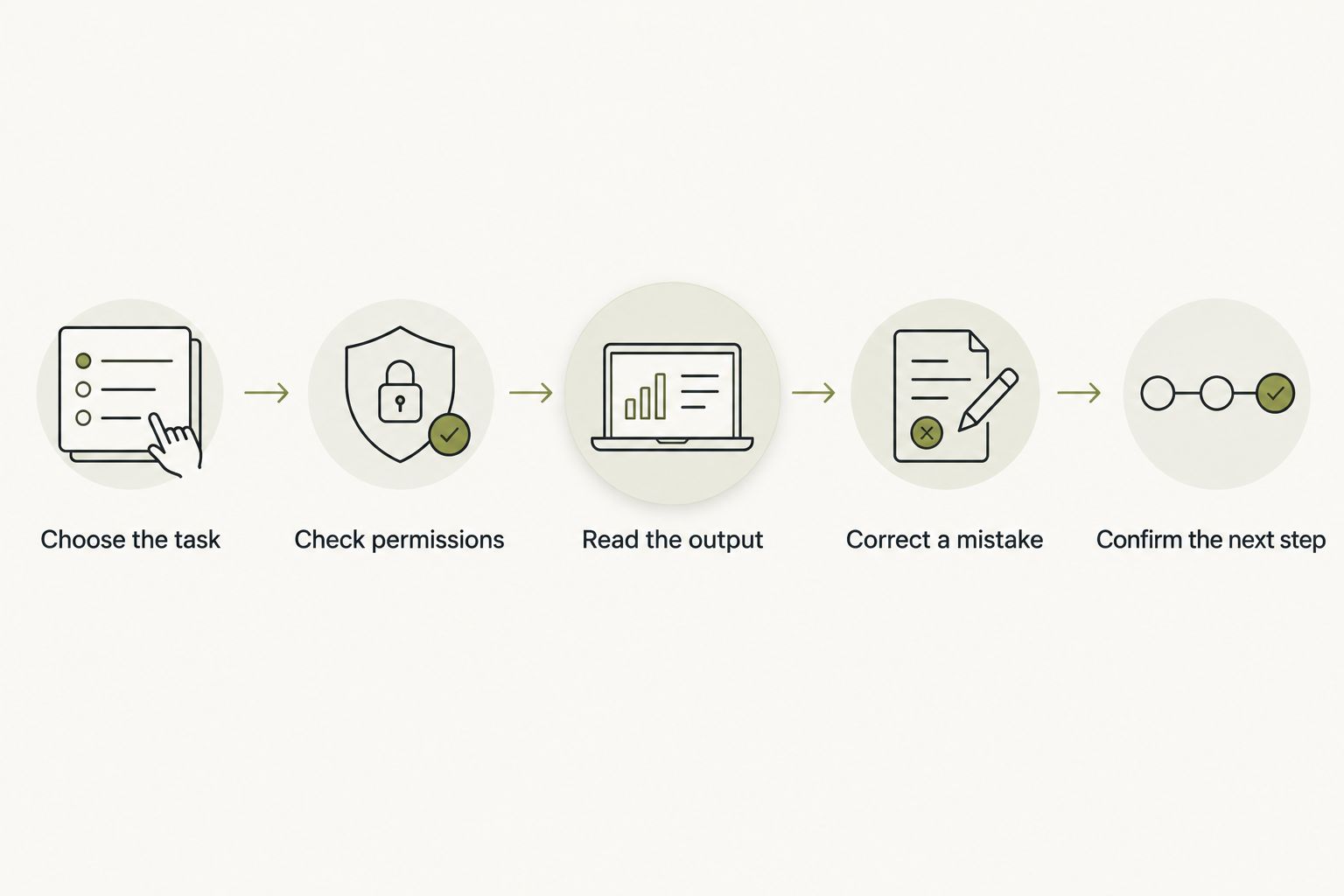
After the trial, write down what worked and what blocked you. A specific observation such as an unreadable confirmation gives you a clearer buying criterion than a general impression that the device felt useful.
Moonshot's role
Moonshot is a wearable for people who want to talk it through and learn from your own life. It hears you out, asks a good question back, and helps turn one thing into the next step, with your yes on each one.
That purpose is distinct from verified hearing accessibility. Do not treat the description as confirmation of live captions, readable replies, vibration alerts, or hearing-device compatibility. Ask which features are implemented in the current product and which remain planned.
A useful question for the contact page is: can I read every question, permission request, and confirmation without hearing spoken output? Ask for a demonstration of that exact interaction.
For Moonshot, the fit is reflection; hearing access requires a separate check. It makes no calls and moves no money. If the thought is a friend you mean to call, you still choose whether to show up and make that call yourself.
Can a wearable replace a hearing aid?
No: conversation capture does not establish hearing-aid functionality. A record of speech and a device intended to address hearing loss serve different purposes. Do not substitute one for the other based on the fact that both involve microphones.
If you use hearing aids or another hearing device, check the proposed wearable alongside your existing setup. Ask about compatibility rather than inferring it from a shared connection method or an accessible-looking demonstration.
Does a screenless wearable have to be inaccessible?
No: screenless does not necessarily mean sound-only. A wearable could provide accessible information through another interface, but that interface must be confirmed for the particular product.
Check what remains available when the phone is put away or disconnected. If an essential interaction depends on another screen, include that screen in your access test instead of evaluating the wearable alone.
How do I separate current features from planned features?
Ask for the current interaction to be demonstrated from start to finish. In 2026, a product description, an exploratory concept, and a feature you can use are not interchangeable evidence.
Ask the seller to identify what works now. Keep planned features out of your decision if those features are necessary for you to use the device.
FAQ
Can an AI wearable work if I cannot hear its spoken replies?
Yes, if it provides the necessary information through an accessible alternative, such as readable text. Verify questions, errors, permissions, and confirmations, not just conversation notes.
Will a wearable help me follow a conversation in real time?
Only a verified real-time feature addresses access during the conversation. A transcript or summary delivered afterward serves later review instead.
Do I need a screen on the wearable itself?
You need an accessible way to receive the information, not necessarily a screen on the wearable. Confirm whether another interface is required and test that complete setup.
Can I use a wearable with my hearing aids?
Compatibility must be confirmed for the specific wearable and hearing aids. Do not assume that one accessible feature establishes compatibility with your existing setup.
Does Moonshot provide live captions for people who are hard of hearing?
Do not assume live captions from Moonshot's description. Request confirmation and a demonstration before choosing it for live conversation access.
What should I test before choosing a wearable in 2026?
Test readable output, noticeable alerts, usable controls, and correction options in your own setting. Include setup and stopping capture, not just the main demonstration.
Should I tell other people before recording a conversation?
Yes, make sure the people involved understand and agree before you start. Accessibility needs do not remove other people's interest in how their conversation is captured or used.
One last thing
Test the stop control before you test the clever feature. You should be able to tell that capture has ended without relying on a sound you cannot hear.
Then test one useful outcome: returning to a thought, checking what someone said, or deciding whether to act. Say it once, inspect what came back, and choose what happens next. A wearable earns its place through that usable exchange, not through the length of its feature list.


