 moonshot

An AI wearable can write emails for you only if it supports email drafting; capturing something you said does not establish that capability. Drafting also differs from opening your inbox or sending a message in your name. Before buying in 2026, verify the exact email workflow, the permissions it requires, and where you give your approval.
- Can an AI wearable write emails for me? Verify email drafting explicitly; capturing a conversation is not enough.
- Moonshot hears you out and asks a good question back; that description does not promise email drafting.
- Keep writing access separate from sending permission, and review the recipient, facts, and commitments yourself.
- Judge the workflow by one useful draft you can review, not a broad promise about handling email.
Can an AI wearable write emails for me?
Look for an explicit email-drafting capability, not an assumption based on the word wearable. A device that captures a thought, a service that turns text into a draft, and a connection that sends email perform different jobs.
The Moonshot description centers on a wearable that hears you out, asks a good question back, and helps you notice what your days keep saying. Treat email writing as a separate feature to verify, not a promise contained in that description.
For a 2026 purchase, distinguish these workflows before deciding what you need:
| Workflow | Best for | Benefit | Limitation |
|---|---|---|---|
| Capture only | Keeping the thought behind a message | Preserves something you want to return to | Does not establish that an email draft will be created |
| Draft for review | Getting wording onto a page | Gives you text to edit before using it | You still check meaning, facts, and tone |
| Approved sending | Sending a reviewed message through a supported connection | Keeps approval attached to the outgoing message | Requires a verified email connection and clear permissions |
| Automatic sending | Workflows deliberately authorized in advance | Removes a separate send decision | Gives you less opportunity to catch an unsuitable message |
These are workflow distinctions, not a list of features offered by a particular device. If you want help writing, you do not necessarily need to grant permission to send.
Why this matters
Imagine you captured a thought after a conversation: you want to thank someone for an introduction. Later, that thought gives you a useful starting point for an email. The benefit is concrete: less time reconstructing what you meant to say.
But a useful starting point is not a finished message. You still need the right recipient, an accurate account of the conversation, and wording you are willing to put your name under.
That distinction matters more than whether the device is worn on your wrist or elsewhere. The practical question is whether the supported workflow carries your meaning from the original thought to a draft you can inspect.
Capture only: keep the thought, not a promise of a draft
Best for: remembering what you wanted to say. A captured thought can supply the subject of a future email without deciding its wording or recipient.
You might say it once: you owe someone a thank-you for making an introduction. When you return to that thought, the useful detail is why the introduction mattered. A generic thank-you loses that detail.
Capture alone does not establish transcription, searchable history, inbox access, or email composition. Check each capability separately rather than treating one as proof of the others.
The limitation is straightforward: you still have to turn the thought into a message. That can be enough if remembering the intention was the difficult part.
Draft for review: get wording without handing over the send decision
Best for: turning a clear intention into editable text. A drafting workflow should let you inspect the actual message before it becomes an outgoing email.
Start with the point you want the recipient to understand. Include the relevant detail and the next step, if there is one. Do not ask for a polished message before deciding what it should say.
The benefit is a starting draft. The limitation is that fluent wording can still misrepresent your intention, add an unsupported detail, or make a commitment you did not mean to make.
For your 2026 shortlist, ask to see where the draft appears. A response displayed in a separate interface is different from a draft placed inside your email account; neither should be described as the other.
Approved sending: keep your yes attached to the message
Best for: a supported email connection with a deliberate review step. Writing permission and sending permission should be separate decisions.
Before approving an outgoing message, inspect the final wording and destination together. Approval of an earlier version does not tell you whether a later edit still says what you intended.
The benefit is control over what goes out in your name. The limitation is that you still need to understand the connection: which account it uses, what access you granted, and how to remove that access.
Do not infer sending support from a demonstration of drafting. Ask whether the demonstrated action is available in the product you would receive, rather than presented as a planned capability.
Why email-writing usefulness varies
The right buying criteria follow the work you want help with. Use these checks instead of comparing broad claims about intelligence:
- Source clarity. Know whether the draft draws on something you captured, text you supplied, or a public source. Those sources are not interchangeable.
- Your intended outcome. A thank-you, a question, and a commitment need different wording. State the purpose before requesting a draft.
- Account permissions. Check whether the workflow requires access to email at all. Do not grant inbox access merely to explore drafting.
- Review location. Find out where you can inspect and edit the complete message, including its recipient and subject.
- Approval boundary. Establish whether your yes applies to creating text, accessing a source, or sending a specific message.
- Current capability. Separate a feature available in 2026 from a concept, demonstration, or future plan.
A longer feature list does not answer these questions. A clear explanation of one real workflow does.
A draft-review process
Use this 5-step process whenever you turn a captured thought into an email. It is a review method, not a claim about any wearable's interface.
1. Choose the source
Identify the exact thought or conversation you want to use. A captured conversation tells you what was said; a public source provides different evidence and should remain distinguishable.
Keep unrelated material out. If the message concerns an introduction, you do not need to add the rest of the day's conversations.
2. State the purpose
Decide what the email should accomplish. Thanking someone is different from asking them to make another introduction.
A clear purpose gives you something to check the draft against. Without it, polished wording can distract from a message that asks for the wrong thing.
3. Check the facts
Review names, dates, and any account of what another person said. Distinguish a fact from an inference: someone mentioning an idea does not establish that they agreed to pursue it.
Remove details you cannot support. An incomplete but accurate message is better than a complete-looking message built on assumptions.
4. Review commitments
Look for promises, deadlines, and requests that were not part of your intention. Even a friendly closing can imply that you have agreed to follow up.
Choose language you can stand behind. Follow-through starts with making a commitment deliberately, not discovering one after the message has gone out.
5. Approve the message
Read the final text beside the recipient and subject. Give your yes to that message, not to an abstract instruction to handle your email.
If you change the purpose or recipient, review it again. The next step should remain yours to choose.
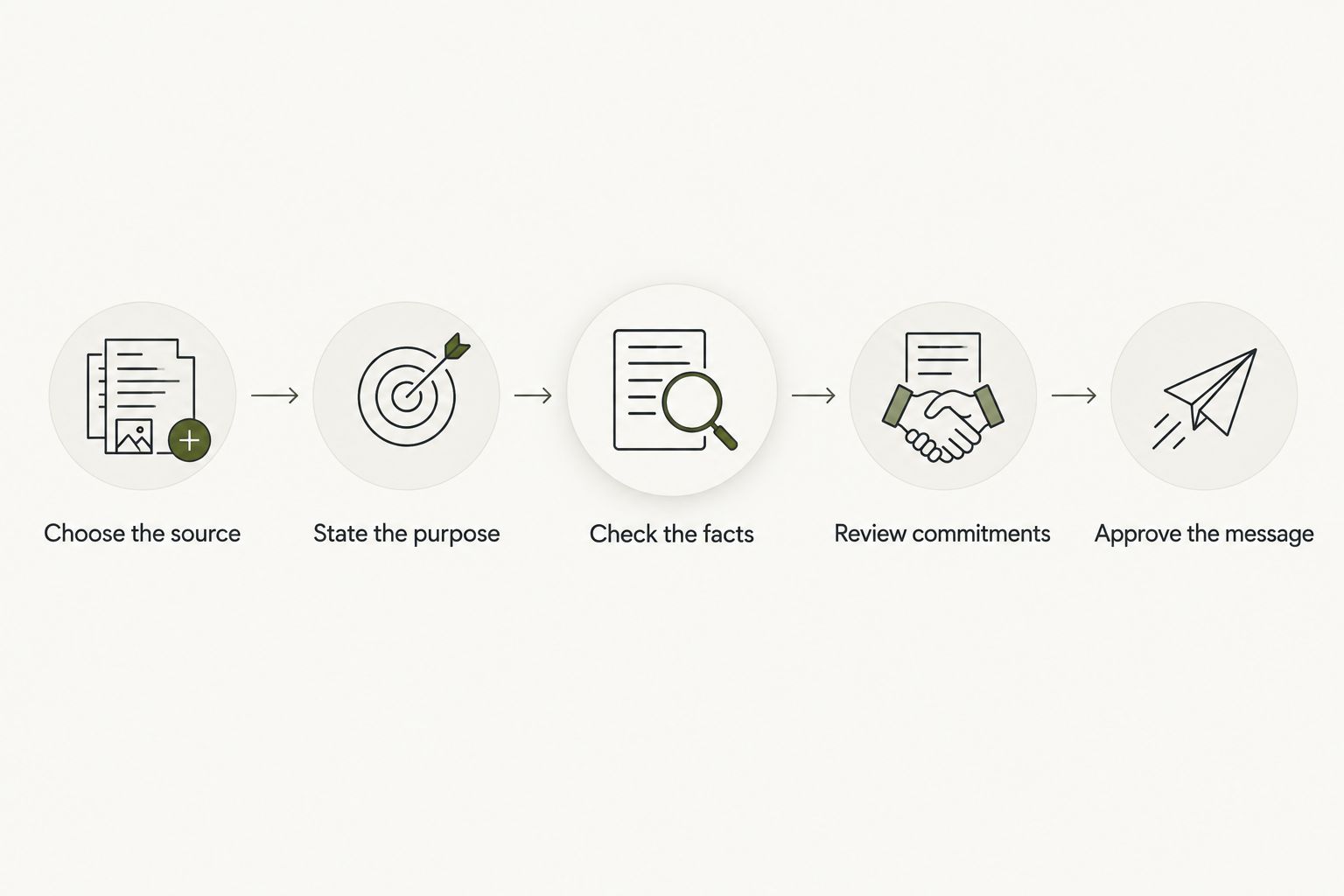
The same review process works whether you write the first draft yourself or use a supported drafting feature. The final check belongs to the person whose name appears on the email.
Can it write an email without reading my whole inbox?
A draft can start from text you deliberately provide; reading your whole inbox is a separate requirement to question. For a simple thank-you, the relevant context might be the introduction and why you appreciated it.
Do not assume a particular wearable offers that workflow. Ask which sources its drafting feature requires, then separately grant only the sources you choose.
Can it send emails without asking me first?
Drafting does not establish permission to send. Check whether a supported email connection allows automatic sending, requires approval for each message, or only creates text.
Your 2026 buying checklist should make that boundary explicit. Nothing should go out in your name without your yes.
Is a wearable the right choice if I mainly want email help?
Choose around the email task, not the device category. If you already know what you want to say and are sitting at your inbox, start by assessing the writing workflow you actually need.
A wearable becomes relevant when capturing the thought earlier is part of the problem you want to solve. That benefit still does not establish an email-drafting or sending feature.
Moonshot's role
Moonshot is for people who want to talk it through and learn from their own life. It hears you out, asks a good question back, and helps you notice what your days keep saying.
That focus fits a different question from whether a device can handle your inbox. You might want to notice the friend you keep meaning to call, then choose how to show up. The choice remains yours.
The limitation for an email-led purchase is equally clear: do not treat Moonshot's stated reflection-focused purpose as confirmation of email drafting, account access, or sending. Check the exact capability before making that task the reason you buy.
FAQ
Can an AI wearable write emails for me in 2026?
An AI wearable can write emails for you only if its supported features include email drafting. Verify that capability separately from capturing conversations, accessing an inbox, and sending messages.
Does capturing a conversation mean a wearable can turn it into an email?
No. Capturing a conversation does not establish email-drafting support; check whether the product explicitly offers that workflow and where you can review the result.
Does a wearable need my email password to help me write?
Writing text and connecting to an email account are different tasks. Check the product's documented connection method and permissions rather than assuming account access is necessary for drafting.
What should I check before sending a generated email?
Check the recipient, factual details, and commitments before sending. Read the complete final message so your approval applies to the text that will actually go out.
Can a wearable decide what I meant from a conversation?
Do not treat an inferred intention as a confirmed fact. State the purpose yourself and correct any draft that turns a passing thought into a promise or request.
Is Moonshot described as an email-writing device?
Moonshot is described as a wearable that hears you out, asks a good question back, and helps you notice what your days keep saying. That description does not establish email drafting or sending.
One last thing
Before choosing a wearable for email, write down the last message you struggled to send. Was the problem remembering the thought, finding the words, checking a fact, or deciding what you wanted?
Buy for that specific problem. A draft helps with wording; it does not decide whether a promise is yours to make. Sometimes the useful next step is not a longer email, but a clearer sentence you are ready to stand behind.


