 moonshot

Yes—an AI wearable can drain your phone’s battery when it uses the phone to transfer recordings, run background tasks, or reach an online service. The amount depends on what the phone actually does; the wearable’s own battery life does not tell you how much phone charge it uses.
- Does an AI wearable drain my phone battery? Yes, when it adds phone activity; Bluetooth alone does not explain the total.
- Check background activity, recording transfers, and network use before blaming the connection itself.
- Compare matched sessions on your own phone rather than treating another person’s battery result as yours.
- Moonshot is best for people who want to talk it through and choose their own next step.
Battery impact
A wearable has its own battery, but that does not make its phone connection free. Your phone still spends energy on whatever work the connection requires. A small transfer and an ongoing upload are different workloads.
If you are considering Moonshot, separate the reason you want the wearable from the battery question. Learning from your own life is the intended benefit. Phone battery impact needs its own check, based on the device’s actual connection and your phone’s usage.
For a purchase decision in 2026, ask what happens on the phone while the wearable is working. A battery-life claim about the wearable answers a different question.
Does an AI wearable drain my phone’s battery?
Yes, if the wearable adds work for your phone. The useful question is which work, how often, and under what conditions. A Bluetooth connection, a recording transfer, and an online request should not be treated as the same activity.
The table describes possible connection patterns, not confirmed features of any particular product. Use it to ask better questions before buying and to understand what you see after pairing.
| Connection pattern | Best for | Phone battery consideration | Trade-off |
|---|---|---|---|
| Occasional Bluetooth transfers | Small, intermittent exchanges | The phone handles connection activity and transfers | Frequent transfers still add work |
| Phone-mediated uploads | Sending captured material through the phone | Bluetooth or another local connection operates alongside internet activity | Network conditions affect the upload workload |
| Processing on the phone | Tasks that explicitly run on the handset | The phone’s processor does additional work | Battery impact depends on the task and its duration |
| Wearable-side processing | Tasks handled on the wearable itself | That task does not need the phone’s processor | Later syncing can still involve the phone |
| Direct wearable connectivity | Devices that explicitly support their own internet connection | The phone is not needed for that particular transfer | The wearable carries its own connection and battery demands |
None of these patterns guarantees a particular percentage of battery loss. A product can also combine them: handle something locally, transfer a result later, and use the phone for a separate task.
Ask which pattern applies to the feature you intend to use. A general statement that a device connects by Bluetooth does not answer where processing or internet access happens.
Connection activity
Bluetooth Low Energy is designed for energy-efficient communication. That does not mean every connected product creates the same workload, or that its entire operation happens over that connection.
A wearable can exchange a short message with a phone. Another workflow can involve transferring captured material and then uploading it over Wi-Fi or cellular data. Those workflows ask different things of the handset.
Evaluate the whole workflow, not just the wireless label. If a feature needs internet access through your phone, a claim about an efficient local connection leaves part of the battery question unanswered.
The same distinction applies when the screen is off. A dark display removes screen activity from the picture, but it does not prove the phone has stopped transferring data or running permitted background tasks.
Reasons battery use varies
Phone battery impact follows the workload and the conditions around it. These are the factors to check before treating a battery result as a product verdict:
- Transfer frequency. Occasional exchanges and repeated transfers create different amounts of communication activity.
- Transfer size. Longer recordings generally contain more data than short text messages, although compression and file format matter.
- Processing location. Work performed on the handset uses its processor; work performed elsewhere has a different phone workload.
- Network conditions. Weak cellular reception can increase phone power use. An upload under poor reception is not equivalent to one under good reception.
- Background behavior. An app that performs permitted tasks while you use something else can consume battery without staying visible.
- Phone condition and settings. Battery health, operating-system behavior, permissions, and other active apps affect the result you observe.
These factors also explain why a single online report is not your forecast. The person reporting it might have a different phone, a different connection, and a different daily routine.
For a useful 2026 comparison, match the conditions before comparing the result. Otherwise, you are measuring several changes at once.
A phone battery check
Use a controlled comparison to see whether the wearable changes your phone’s battery use. This is a practical screening method, not a laboratory measurement or a promise of daily runtime.
Choose an ordinary period when you can keep phone use reasonably similar. Avoid comparing a quiet hour at home with an hour of navigation, photos, and calls.
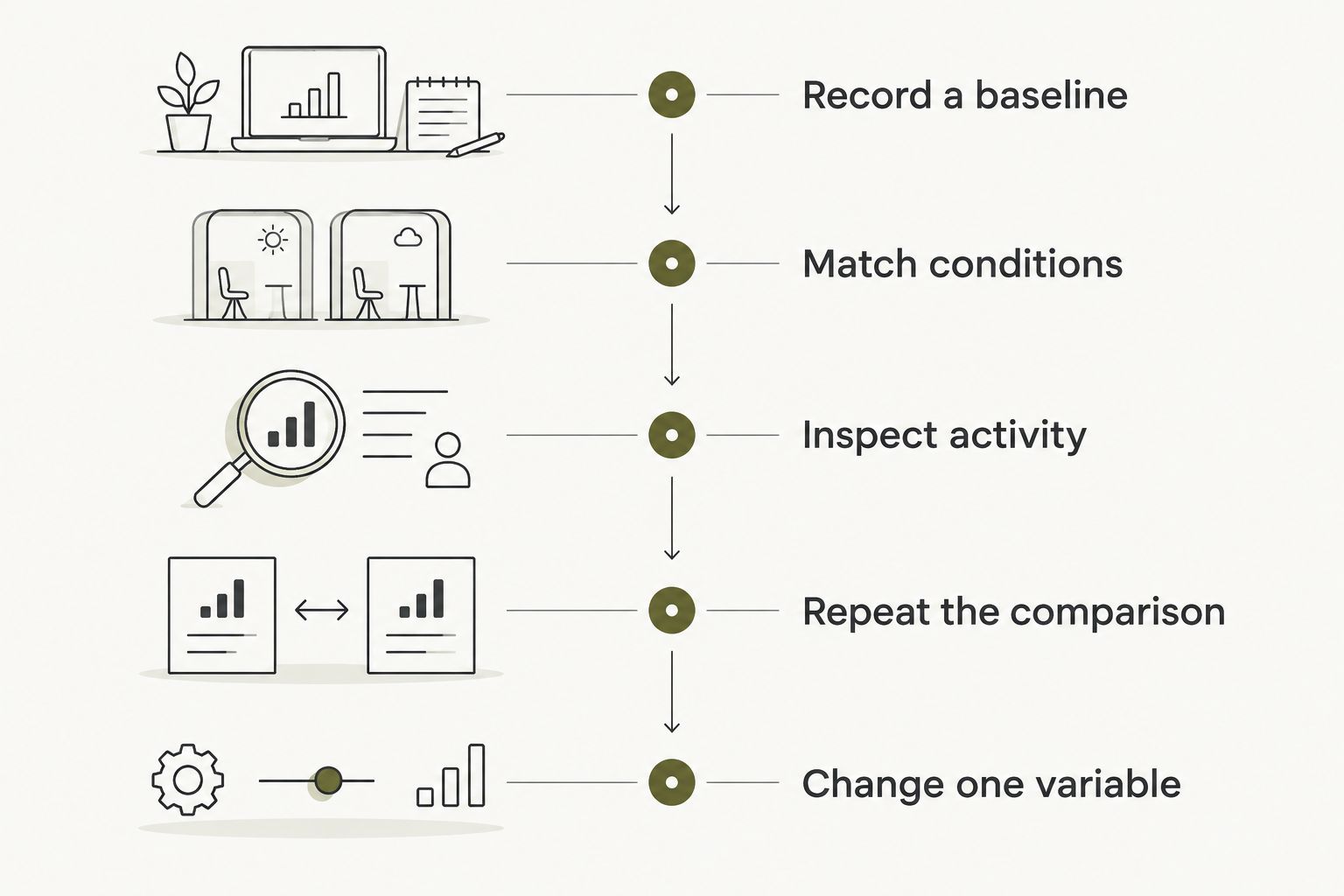
- Record a baseline. Note the phone’s starting charge. Use the phone normally for a suggested 60-minute session without the wearable connected, then record the ending charge.
- Match conditions. Repeat a 60-minute session with similar screen use, location, reception, and network connection. Keep the wearable connected and use the feature you actually care about.
- Inspect activity. Open the phone’s battery settings. Check the relevant app’s activity alongside screen use and other active apps.
- Repeat the comparison. Run another matched pair rather than treating one session as the final answer.
- Change one variable. If the connected session shows more drain, compare a quiet connected period with a period that includes transfers or uploads.
Keep a brief record of what happened during each session. A video call, a navigation trip, or a large download can explain a difference that has nothing to do with the wearable.
Do not extend an hour’s result into an all-day prediction by simple multiplication. Real use includes idle periods, changing reception, and different amounts of screen activity. Test the routine you intend to keep.
Battery readings
Your phone’s battery settings help identify activity, but the labels need care. An app’s reported share of battery use is not necessarily the number of percentage points it removed from a full charge.
Read the reporting period and the operating system’s explanation. A large share during a quiet interval can represent a different amount of energy from the same share during a busy day.
Use these 3 checks together:
- Total change: How much did the phone’s charge fall during the session?
- App activity: Did the wearable’s app show foreground or background work during that period?
- Other activity: Did screen use, navigation, calls, or another app change between sessions?
Treat app battery share as a clue, not a standalone runtime measurement. The strongest practical evidence is a repeatable difference under matched conditions, supported by activity that explains it.
If the phone becomes unusually warm, inspect the activity rather than assuming the wearable caused it. Charging, navigation, downloads, and other workloads can also produce heat.
Battery-saving choices
Start with a change that preserves the reason you bought the wearable. Turning everything off can reduce activity while also removing the feature you wanted to use.
| Adjustment | Best for | Benefit | Limitation |
|---|---|---|---|
| Use a reliable connection | Uploads that rely on the phone | Avoids making poor reception part of the test | A reliable connection does not eliminate transfer work |
| Reduce unnecessary app opening | Checking whether the wearable is working | Removes repeated screen use from the routine | Does not stop permitted background tasks |
| Review source permissions | Keeping access aligned with your choices | Makes each granted source deliberate | Permissions are not a direct measure of battery use |
| Restrict background activity where supported | Investigating unexplained background use | Helps isolate the effect of background work | Can delay or interrupt expected behavior |
| Disconnect temporarily | Establishing a comparison baseline | Separates connected and disconnected periods | Connected features cannot operate normally during the test |
Do not remove a permission and assume everything still works as before. Check the product’s instructions, make one change, and test the feature again.
During your 2026 setup, grant each source separately and keep the choices tied to what you want to do. Permission to use a source is not permission to send something in your name.
Moonshot and the next step
Moonshot is best for people who want to talk it through and choose their own next step. It hears you out and asks a good question back. You decide what deserves follow-through, with your yes on each next step.
Consider a simple situation: you captured the thought that you keep meaning to call a friend. Later, that thought gives you something concrete to consider. You choose whether making the call is what you want to do; the wearable makes no calls and moves no money.
That distinction matters when weighing the benefit against another device to manage. The useful outcome is not a longer record of everything. It is deciding what you want to show up for.
The trade-off is practical: you add a wearable to your routine, and its phone battery impact remains a separate question from its reflective purpose. Evaluate both. Start with one thing you want to say once and return to during your first week, rather than expecting every part of your day to change.
Will a wearable drain my phone when I am not using it?
A wearable can contribute to phone battery use while you are not actively opening its app if the connection or permitted background tasks remain active. Screen-off time is not the same as phone inactivity.
Check the battery activity for that interval. Compare a quiet connected period with a quiet disconnected period before attributing the difference to the wearable.
Does turning off Bluetooth stop all wearable-related battery use?
Turning off Bluetooth stops that connection, but it does not necessarily stop work already underway on the phone. An app can still have a pending upload or another permitted task that uses internet access.
For your 2026 check, inspect app activity as well as the Bluetooth setting. Also confirm which expected features stop working when you disconnect.
Is a wearable’s battery-life claim enough to judge phone drain?
A wearable’s battery-life claim is not a phone battery measurement. It describes the wearable under the conditions attached to that claim.
Ask for a separate explanation of phone involvement. Useful details include whether the phone transfers captured material, performs processing, or provides the internet connection.
FAQ
Does an AI wearable drain my phone battery even with the screen off?
Yes, it can use phone battery with the screen off if transfers or permitted background tasks continue. Check the phone’s battery activity for the same period rather than using screen state as the test.
Is Bluetooth the main reason a wearable drains my phone?
Bluetooth is only one possible contributor. Processing, uploads, app activity, and network conditions can also affect phone battery use.
How can I test wearable battery drain in 2026?
Compare matched connected and disconnected sessions, then inspect the phone’s battery activity. Keep screen use, reception, and other workloads similar, and repeat the comparison.
Will battery saver affect my wearable connection?
Battery-saving settings can restrict background activity and affect connected features. Check your phone’s settings and the product’s instructions, then test the behavior you need.
Does processing on the wearable mean zero phone battery use?
Processing on the wearable removes that particular processing task from the phone, not every possible phone task. Syncing, app use, or phone-mediated uploads can still consume energy.
What should I check before choosing Moonshot?
Check whether its reflective purpose fits your routine, then evaluate phone involvement separately. It hears you out and asks a good question back; you choose the next step.
Should I judge a wearable by one day of battery use?
No—one day mixes the wearable’s activity with everything else your phone did. Repeat a matched comparison before treating the result as your normal battery impact.
One last thing
Your battery test can change the behavior you are trying to measure. Repeatedly waking the screen to check the percentage adds phone use of its own.
For your next 2026 comparison, record the starting charge, leave the phone to its planned routine, and check again at the end. Measure the wearable’s effect, not the extra checking you did because you were measuring it.


