 moonshot
No—an AI wearable does not necessarily need a SIM card to work: it can connect through your phone, use Wi-Fi, or perform supported tasks offline. A wearable that connects directly to a cellular network needs a supported cellular subscription and SIM credentials, which can come from an embedded eSIM rather than a removable card.
- Does an AI wearable need a SIM card to work? No: Bluetooth and Wi-Fi connections do not require one.
- Bluetooth is best for keeping your phone nearby; cellular is best for supported use away from your phone.
- An eSIM replaces a removable SIM card, not the need for a supported cellular subscription.
- Check offline capture separately from online processing, syncing, and actions.
For a wearable such as Moonshot, start with the moment you want help with. Then check which connection that particular task requires. The word wearable alone does not tell you whether a phone must stay nearby.
Does an AI wearable need a SIM card to work?
Only direct cellular connectivity requires cellular SIM credentials. Bluetooth and Wi-Fi do not require a SIM in the wearable. Offline functions do not require a network connection, although their scope depends on the device.
For your 2026 buying decision, separate the connection from the feature. A device might capture something without internet access but need a connection before it can process or sync it.
| Connection | SIM in the wearable? | Best for | Main advantage | Main limitation |
|---|---|---|---|---|
| Bluetooth through a phone | No, for the Bluetooth link | Keeping your phone nearby | Can use the phone as the route to online services | Phone-dependent features require the supported phone connection |
| Wi-Fi | No | Supported use within Wi-Fi coverage | Connects without a cellular subscription in the wearable | Leaving the network removes that connection |
| Direct cellular | SIM credentials required; removable card not always required | Supported use away from a phone and Wi-Fi | Provides a direct mobile-network connection | Requires compatible hardware, service, and coverage |
| Offline operation | No | Tasks explicitly supported without internet | Does not depend on an active network for those tasks | Does not provide access to remote services |
These are connection methods, not promises about every product. A wearable can support more than one method, and each feature can have different requirements.
Why this matters
Imagine you deliberately capture a thought after lunch: you want to call someone you keep meaning to reach. Later, you want to return to that thought and choose the next step.
The useful question is not simply whether the wearable switched on. Ask whether it captured the thought, made it available later, and supported the follow-through you expected. Those are separate tasks.
A connection label cannot answer all of them. Bluetooth support does not establish offline capture. Cellular support does not establish that every feature works without a phone. Read the requirements for the task, not just the connection badge.
Bluetooth through your phone: no SIM in the wearable
A Bluetooth connection links the wearable to a nearby compatible device, commonly your phone. Bluetooth itself does not need a mobile-network subscription or SIM card.
When the wearable relies on your phone for internet access, the phone supplies that route. The phone can be online through Wi-Fi or its own cellular connection; the wearable does not need its own SIM for the Bluetooth link.
Best for: people who already carry their phone. The advantage is a connection arrangement that uses a device you already have with you. The limitation is dependence on that phone for any functions routed through it.
Before choosing a Bluetooth-based wearable in 2026, check the supported phone operating system and the requirements for its app. Also check what happens when Bluetooth disconnects. Do not treat a paired connection as evidence that everything continues without it.
Wi-Fi: no cellular SIM required
Wi-Fi gives a supported wearable access to a local wireless network. It does not require a SIM card in the wearable, although the network itself needs an internet connection for access to online services.
Best for: supported use where you have reliable Wi-Fi access. The benefit is internet connectivity without a cellular subscription in the wearable. The trade-off appears when you leave the network's coverage.
Network access also deserves a closer look. A device that joins your home network does not necessarily support a hotel's sign-in page or an organization's restricted network. Verify the networks you actually expect to use.
Do not assume Wi-Fi support means phone-free setup. A product can use Wi-Fi for data while still requiring a phone for configuration, account access, or particular controls.
Direct cellular: a SIM or eSIM is required
A cellular wearable connects directly to a mobile operator's network. It needs compatible cellular hardware, supported service, and SIM credentials to establish that connection.
A removable SIM card is one way to supply those credentials. An eSIM supplies them through an embedded component and a downloaded service profile. No removable card does not mean no SIM.
Best for: people who need supported online functions away from both their phone and Wi-Fi. The advantage is a direct network connection. The limitation is that cellular service still depends on coverage and compatibility.
For a 2026 purchase, verify the supported operator and country before treating cellular as a solution. Also ask which functions work independently. Direct connectivity does not, by itself, establish calling support, phone-free setup, or access to every feature.
Offline operation: check the exact task
Offline operation means a particular function works without an active network connection. It does not mean every function on the wearable works offline.
For example, local capture and remote processing are different operations. A device with documented local capture can retain an input without immediately sending it to an online service. That does not establish that the device can also interpret the input locally.
Best for: people whose required task is explicitly supported offline. The advantage is independence from a live connection for that task. The limitation is that online services remain unavailable until connectivity returns.
Ask what happens to pending work after reconnection. Does the product document later syncing? Does the person need to start it? Those details determine whether a disconnected moment becomes useful later.
Connection requirements vary by task
The SIM question becomes clearer when you identify what the wearable must do. These factors determine the connection you need:
- Processing location. A task handled on the device has different requirements from one handled by a remote service.
- Phone dependence. Some functions use a phone connection; a separate function might not.
- Network access. Bluetooth, Wi-Fi, and cellular provide different routes, each with its own requirements.
- Local capture. Recording or saving an input offline is separate from processing or syncing it.
- Setup requirements. A device's everyday connection does not establish how initial configuration works.
- Permissions. Network access does not grant access to a conversation, account, or other source.
Keep the last distinction clear. A captured conversation is not a public source. A fact stated in that conversation is not the same as an inference drawn from it. A connection provides a route for data; it does not settle what the device should receive or do.
A practical connection check
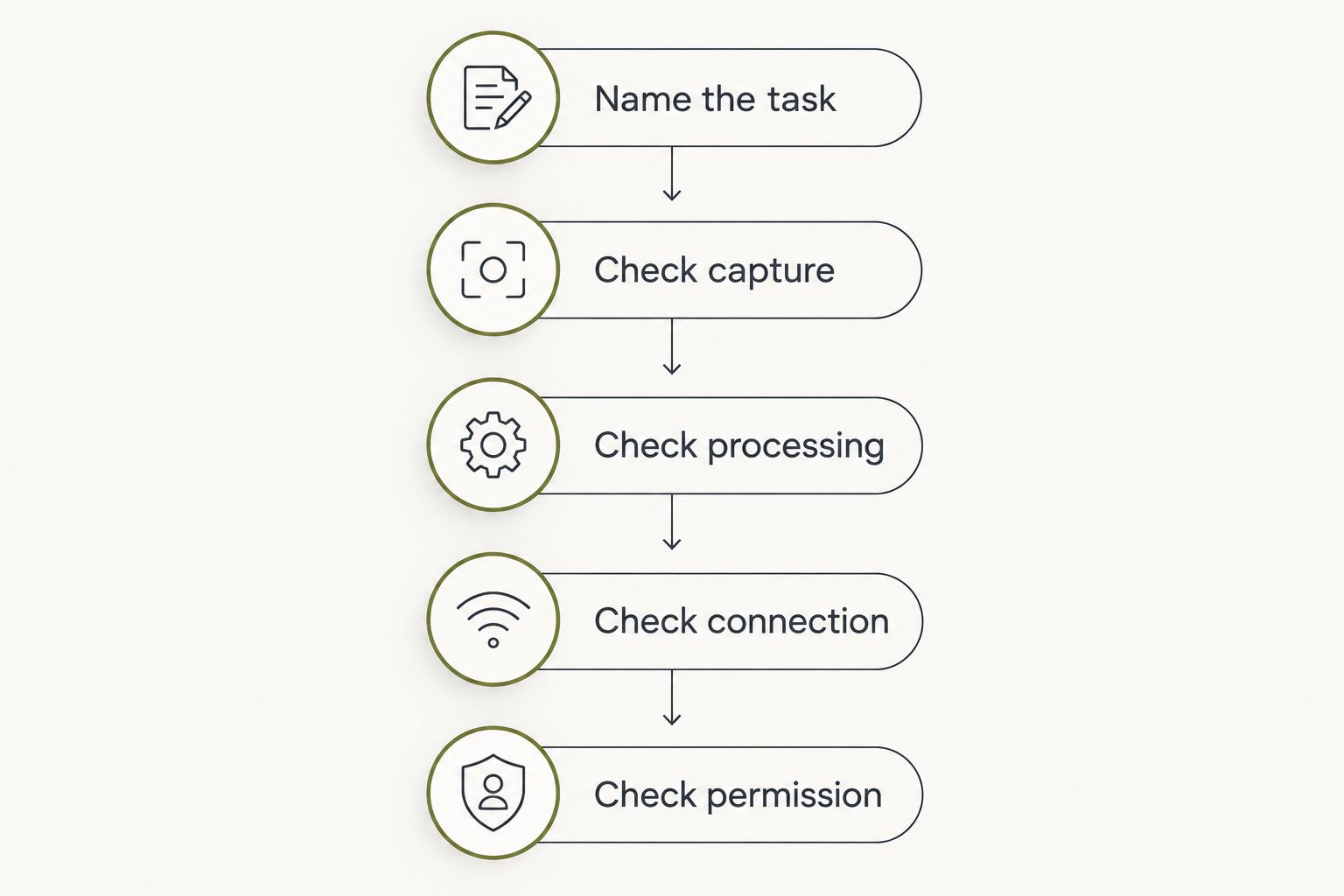
Use this sequence when reading a wearable's documentation in 2026. Start with your intended result, then trace the requirements backward.
- Name the task. Write down one concrete result, such as returning to a thought you intentionally captured earlier.
- Check capture. Establish whether the device can save that input without a phone or internet connection.
- Check processing. Find out whether the useful result comes from the device, a phone, or an online service.
- Check connection. Identify the supported route: Bluetooth through a phone, Wi-Fi, or direct cellular.
- Check permission. Confirm which sources you choose to share and which actions require your approval.
This avoids a common mismatch: buying for phone-free use when only the capture stage is phone-free. It also avoids rejecting a useful phone-connected device simply because it has no SIM slot.
The strongest answer names the task and its dependency together. Look for language that distinguishes what works now from a planned capability. A future feature is not a reason to assume today's device works without your phone.
Can an AI wearable work without a phone?
An AI wearable can work without a phone for functions its hardware and software support independently. That can include documented offline functions or functions using the wearable's own Wi-Fi or cellular connection.
Phone-free operation and internet-free operation are different. Ask about initial setup, everyday use, and disconnected use separately rather than accepting one broad claim.
Does an eSIM wearable still need a cellular subscription?
An eSIM wearable needs supported cellular service to use the mobile network. The eSIM changes how the service credentials are stored and provisioned; it does not create network access on its own.
Check whether the service works in the country where you intend to use the device. Also verify the particular wearable, rather than assuming an operator supports it because the operator supports other eSIM devices.
Does a wearable need internet to save a thought?
A wearable does not need internet to save a thought if it supports local capture and storage. Whether a particular product does so is a product-specific question.
Keep saving separate from making sense of what you saved. A captured input can exist locally while transcription, interpretation, or syncing still waits for a connection.
The next step matters more than the SIM slot
Moonshot is best for people who want to talk it through and choose the next step. The wearable hears you out, asks a good question back, and helps you learn from your own life.
Consider a first-week goal: return to the call you said you wanted to make. You say it once, decide whether it still matters, and choose how to show up. The priority is yours, not something a device should choose for you.
Moonshot turns one thing into a next step, with your yes on each one. It makes no calls and moves no money. That boundary matters as much as connectivity: access to a network is not permission to act in your name.
When assessing the wearable, keep the connection questions specific. Look for explicit documentation of phone dependence, offline behavior, and supported networks rather than inferring those details from its purpose.
FAQ
Does an AI wearable need a SIM card to work in 2026?
No. An AI wearable can use Bluetooth through a phone, Wi-Fi, or supported offline functions without a SIM in the wearable. Direct cellular access requires SIM credentials and supported service.
Can I use a wearable if my phone has no SIM?
Yes, if the required functions work through Bluetooth, Wi-Fi, or offline operation. A phone without a SIM can still use Wi-Fi, but that does not establish compatibility with a particular wearable.
Is an eSIM the same as having no SIM?
No. An eSIM stores cellular service credentials through an embedded component rather than a removable card. Supported cellular service is still required for mobile-network access.
Will a Bluetooth wearable work when I leave my phone at home?
Only functions documented to work without that phone connection will remain usable. Check offline capture and any independent network support separately.
Does Wi-Fi mean a wearable never needs a phone?
No. A wearable can use Wi-Fi for internet access and still require a phone for setup, account access, or specific functions.
Does cellular connectivity let a wearable make phone calls?
Not automatically. Cellular data connectivity does not establish calling support; calling requires explicit support in the device and its service.
Does Moonshot make calls for me?
No. Moonshot makes no calls and moves no money. It helps turn one thing into a next step, with your yes on each one.
One last thing
Ask one question before choosing: What still works when the connection disappears? Request an answer for capture, processing, and later access separately.
That answer tells you more than the presence of a SIM slot. Choose the connection that supports your actual next step—not a connection label that leaves the useful part unexplained.


