 moonshot
There is no single charging time for an AI wearable: the answer depends on the model, its starting battery level, and the charging setup its maker specifies. For a useful answer in 2026, look for a documented empty-to-full time—not a quick-charge claim or the time needed to recharge a separate case.
- How long does an AI wearable take to charge? Use the specific model’s documented charging time, not a category average.
- A quick-charge claim does not tell you how long a full charge takes.
- Moonshot is a wearable for people who want to learn from their own life.
- Check the required charger, starting battery level, and full-charge indicator before planning a charging routine.
How long does an AI wearable take to charge?
Use the manufacturer’s full-charge timing for the exact model you are considering. A charging estimate only answers the question when you know where the battery starts, where it finishes, and which power source the estimate assumes.
For Moonshot, check the published product information for an explicit charging specification before building your routine around a duration. A description of what a wearable does is not evidence of how quickly its battery charges.
Different charging statements answer different questions:
| Charging statement | Best for | What it tells you | What it leaves unanswered |
|---|---|---|---|
| Empty-to-full charging time | Planning a complete recharge | The stated duration under the maker’s test conditions | Whether your setup matches those conditions |
| Quick-charge claim | Planning a short top-up | What a specified charging session provides | How long a full charge takes |
| Charging-case recharge time | Planning when to recharge a case, if supplied | How long the case takes to recharge | How long the wearable itself takes |
| Battery runtime | Planning time away from power | How long a charged device is stated to operate | How long replenishing that battery takes |
Do not substitute one row for another. A long runtime does not establish a short charging time, and a quick top-up does not establish a full-charge duration.
Why this matters
You put a wearable on because you want to use it during your day. Charging introduces a practical question: when can you take it off without losing the moment you wanted to capture?
The useful comparison is not simply which device charges fastest. It is whether the documented charging routine fits the time you already spend without it. A device that requires an inconvenient charging arrangement deserves closer attention, even when its headline battery claim sounds appealing.
For a 2026 purchase, keep the charging question separate from the product’s promised benefit. First decide whether the device does something you want. Then check whether you are willing to maintain its battery routine.
Full charging and quick charging
A quick-charge statement is not a full-charge specification. Read both the charging duration and the outcome attached to it.
A manufacturer might describe a short charging session in terms of additional use rather than a completely replenished battery. That can help you judge a top-up before leaving home. It does not tell you when the battery will reach its full-charge indicator.
A full-charge claim needs its own endpoint. Check whether the documentation refers to the wearable, a removable battery, or a charging case. Those are separate things to recharge when a particular model includes them.
Keep the benefit and limitation together:
- Full charging: useful when you want to begin with a replenished battery; it requires time connected to power.
- Quick charging: useful when your available charging window is short; it does not necessarily replenish the whole battery.
- Case charging: useful for understanding a case-equipped model’s routine; it adds another battery whose status you must check.
Choose the measure that matches your actual question. If you need to leave soon, full-charge timing alone is not enough.
Why charging time varies
Charging is not just a property of the wearable. It depends on the battery’s condition and the power path supplying it. These are general battery considerations, not charging specifications for a particular product.
- Starting charge: A partly charged battery has less energy to replenish than an empty one. Compare timings that use the same starting point.
- Charging stage: Lithium-ion charging typically reduces current near full charge. Do not assume the final portion takes the same time as an earlier portion.
- Compatible power source: The device and its supported charging equipment determine the usable power. A higher-rated adapter does not force the wearable to accept more.
- Temperature: Battery protection systems can limit or pause charging outside supported conditions. Follow the model’s stated operating and charging limits.
- Activity during charging: Where a device supports use while connected, operation consumes power too. Check whether the published estimate assumes the device is idle or switched off.
- Connection quality: A loose connection or improperly seated charging contact can interrupt charging. Confirm that the device actually indicates a charging connection.
These factors explain why a duration measured in one setup is not a promise for every setup. They do not justify inventing a different estimate.
A charging check you can repeat
A repeatable check helps you learn what charging looks like in your own routine. It is a personal observation, not a replacement for the manufacturer’s instructions or a laboratory test.
- Check the instructions. Identify the supported power source, cable, dock, or case for your exact model. Follow any setup instructions before starting.
- Confirm the connection. Look for the documented charging signal. Being attached to a cable or resting on a dock is not, by itself, confirmation.
- Record the start. Write down the starting battery indication and the time. Also note whether the wearable is operating, idle, or switched off.
- Wait for completion. Use the manufacturer’s stated full-charge indicator. Record when it appears rather than guessing from an intermediate reading.
- Compare like conditions. If you repeat the check, keep the starting level and equipment as consistent as practical. Note any interruptions.
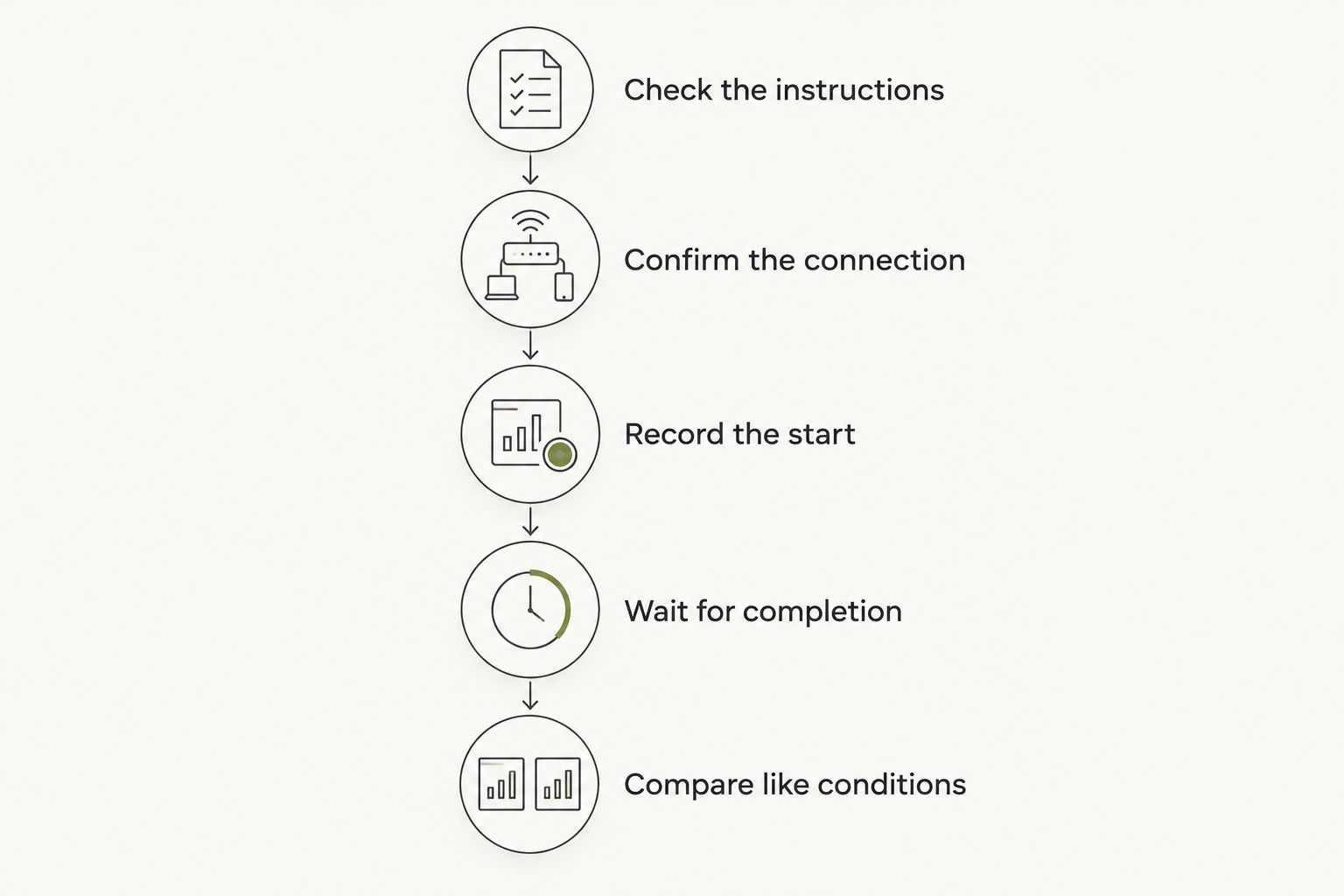
You do not need an elaborate spreadsheet. A short note containing the starting indication, equipment used, and completion time gives you a clearer reference than a remembered impression that charging felt slow.
Does a more powerful charger make a wearable charge faster?
A higher-rated charger does not automatically shorten charging time. The wearable must support the relevant power delivery, and the cable or charging accessory must also be suitable.
Choose equipment by compatibility first. Do not buy a larger adapter solely because its power rating is higher than the one described in the instructions. That rating describes what the adapter can supply, not what every connected device will accept.
If charging seems slow, first confirm the supported setup and the charging indicator. Changing several pieces of equipment at once makes it harder to identify what changed the result.
Can you use a wearable while it charges?
Only plan around use during charging when the manufacturer explicitly supports it. A charging port does not establish that the device remains usable while connected, and a charging dock might require you to remove it.
This matters when the purpose of the wearable depends on having it with you. A device sitting beside an outlet is not being worn, even if some functions remain available.
Check the physical routine as well as the electrical specification. Where does the device sit? What do you remove? What confirms that charging has started? These questions help you judge daily convenience without assuming undocumented features.
What to check before choosing a wearable
For a 2026 buying decision, ask for charging information specific enough to use. Broad language about lasting through your day does not answer how long the device spends connected to power.
Look for:
- A stated full-charge duration and its starting battery condition.
- The required charging equipment and whether it is included.
- A clear description of the charging and full-charge indicators.
- Instructions for supported charging temperatures and placement.
- Separate explanations for the wearable and a case, if the model uses one.
- A distinction between current functionality and anything described as planned.
Treat unanswered questions as unanswered. Do not turn a product illustration, a connector shape, or a general battery claim into a specification.
The same discipline applies to the product’s purpose. Moonshot hears you out, asks a good question back, and helps you notice what your days keep saying. Charging information needs its own evidence; those benefits do not establish battery performance.
A routine built around the next step
Choose a charging window you can actually keep. If you normally set a wearable down while getting ready, check whether its documented charging routine fits that interval. If it needs a different arrangement, decide whether that arrangement is acceptable before buying.
Keep the payoff concrete. You said you wanted to call a friend. The useful next step is deciding whether to make that call—not maintaining a device for its own sake.
Moonshot is for people who want to learn from their own life. You can talk it through, say it once, and choose the next step, with your yes on each one. It makes no calls and moves no money; follow-through remains your choice.
A charging routine should support that purpose. It should not become another reason you cannot show up for something you already decided matters.
A slow charge needs a check, not a guess
If your wearable takes longer than its documented estimate, return to the stated conditions. Compare the starting battery level, supported equipment, device activity, and temperature before deciding the battery has a problem.
Check for an interrupted connection using the manufacturer’s instructions. Do not scrape charging contacts, apply liquids, or improvise a repair based on general advice. Use the cleaning and troubleshooting method specified for the device.
A duration alone does not diagnose battery health. An unusually warm, damaged, or swollen device needs safety attention rather than another timing experiment. Stop using it and follow the manufacturer’s safety guidance.
For troubleshooting in 2026, keep a brief record of what happened. A clear account of the equipment, battery indication, and interruption is more useful than a claim that charging always takes too long.
FAQ
How long does an AI wearable take to charge from empty?
An AI wearable’s empty-to-full charging time depends on the exact model and its specified charging setup. Use the manufacturer’s documented duration and test conditions rather than a category-wide estimate.
Does a quick charge mean the battery is full?
A quick charge does not necessarily mean the battery is full. Check whether the claim describes a battery level, additional runtime, or a completed charge.
Will a higher-powered charger charge my wearable faster?
A higher-powered charger does not automatically charge a wearable faster. The wearable and its charging equipment must support the relevant power delivery.
Why does the end of a charge take longer?
Lithium-ion charging typically reduces current as the battery approaches full charge. An earlier charging interval therefore does not establish the time needed to finish.
Can I wear my device while it charges?
Only wear or use a device while charging if its manufacturer explicitly supports that arrangement. Follow the model’s instructions for connection, placement, and use.
What charging details should I check before buying in 2026?
Check full-charge timing, supported equipment, and the indicators that confirm charging and completion. Read any case-charging information separately from the wearable’s own charging information.
One last thing
Measure the charging window you need, not just the time to full. If you usually connect a partly charged wearable, an empty-to-full estimate answers a different question from your everyday routine.
Keep both references: the manufacturer’s published conditions and a simple record of your own supported setup. In 2026, that is a sounder basis for planning than borrowing a charging time from a different device.


