 moonshot

An AI wearable needs enough storage to hold the material you choose to capture until it can transfer or delete it; there is no universal minimum in gigabytes. For a 2026 purchase, the useful answer depends on the recording format, time between transfers, and whether original recordings remain on the device, your phone, or a remote service.
- How much storage does an AI wearable need? Match capacity to recording format, transfer frequency, and retention.
- Moonshot focuses on reflection and a next step you choose, not a stated storage-capacity promise.
- Device storage, phone storage, and remote storage are separate limits; check each before choosing.
- Ask what happens when storage fills, including whether untransferred recordings are protected.
How much storage does an AI wearable need?
An AI wearable needs enough usable capacity for the recordings it must retain between successful transfers. A capacity figure alone cannot answer that question. The same amount of storage holds different recording lengths when file formats and quality settings differ.
If you are considering Moonshot, start with the moment you want to return to, then ask how that moment is stored. The product description explains the experience: it hears you out, asks a good question back, and helps you notice what your days keep saying. That description is not a storage specification.
Use this sequence to assess any wearable in 2026:
- Capture format. Establish whether the device saves audio, text, images, or another format. Do not assume a wearable includes a camera.
- Usable capacity. Ask how much space is available for your recordings, rather than relying only on total hardware capacity.
- Transfer interval. Find out when recordings leave the device and what connection the transfer requires.
- Retention policy. Check whether successful transfer removes the original, keeps a copy, or requires your decision.
- Full-storage behavior. Ask whether recording stops, older material is replaced, or a warning gives you time to act.
These answers establish the storage requirement. A larger number without them leaves the central question unanswered: will the moment you intended to keep still be there?
Storage and useful follow-through
Suppose you capture a thought about a friend you mean to call. Later, you want that thought to help you show up and make the call. Keeping the original recording indefinitely is a separate decision from keeping a short note about what you intended.
That distinction matters because a recording and a useful next step are not interchangeable. An original can preserve wording and context; a short note is easier to revisit but leaves material out. Decide which you need before treating more storage as the better choice.
Moonshot is best for people who want to talk it through and choose the next step themselves. Its stated purpose is to help you learn from your own life. Assess storage against that purpose without assuming an unstated capacity, connection, or retention policy.
Storage locations
A wearable's advertised capacity describes only part of the path. Depending on the product's design, a recording can remain on the device, move to a phone, or transfer to a remote service. Confirm which locations the product actually uses.
| Storage location | Best for | Practical benefit | Limitation to check |
|---|---|---|---|
| On the wearable | Keeping captures before transfer | Material can remain on the device between connections | Capacity is finite; full-storage behavior matters |
| On your phone | Keeping a local copy outside the wearable | Moves storage demand away from the wearable | Uses phone space; transfer and backup behavior vary |
| On a remote service | Keeping material beyond local hardware | Retention need not depend entirely on device capacity | Access, account limits, and deletion rules need checking |
These are storage locations, not mutually exclusive product recommendations. A design can use more than one. A copy moving elsewhere also does not prove that the earlier copy has been deleted.
For your 2026 comparison, ask for the complete path of a capture. Where does it begin, where does it go, and what remains after each transfer? That explanation is more useful than a capacity figure detached from the process.
Capacity, recording time, and units
Gigabytes measure data, not hours of recording. To convert capacity into recording time, you need the rate at which the device creates data. That rate depends on the format and settings.
The standard decimal units provide a starting point:
- 1 byte equals 8 bits. Recording rates expressed in bits must be converted before comparing them with capacity expressed in bytes.
- 1 megabyte equals 1,000,000 bytes. The decimal abbreviation is MB.
- 1 gigabyte equals 1,000 megabytes. The decimal abbreviation is GB; binary units use different names, such as GiB.
Those definitions do not establish a wearable's recording capacity. They help you read specifications without confusing a data rate with a storage allowance.
The calculation is straightforward: multiply the recording data rate by the capture duration, using matching units. Then compare the result with usable storage, accounting for other files the product retains.
If a manufacturer publishes recording hours, check the conditions behind that figure. A duration measured with one recording setting is not automatically valid for a different setting. Likewise, a transfer-ready device and a device disconnected for an extended period face different storage demands.
Storage requirements by capture type
The material you keep changes the storage question. Compare capture types only after confirming that the product supports them; a wearable's appearance does not establish its capabilities.
| Capture type | Best for | What you retain | Trade-off |
|---|---|---|---|
| Original audio | Returning to exact spoken wording | The recorded sound | Requires more data than a plain-text rendering of the same speech |
| Transcript | Searching and rereading spoken content | A text rendering | Does not preserve the original sound and can contain transcription errors |
| Summary | Reviewing selected points | A shortened account | Omits detail and is not a substitute for the original |
| Chosen next step | Following through on an intention | The action you decided to take | Does not preserve the full conversation behind the decision |
A transcript, summary, and next step serve different purposes. None should silently stand in for another. If exact wording matters, verify whether the original remains accessible rather than assuming that a readable summary proves it does.
For a 2026 purchase, ask which of these materials the stated storage allowance includes. A limit described as recording time does not necessarily describe transcript retention, and an account's saved-history allowance does not establish the wearable's offline capacity.
Storage requirement drivers
Storage needs vary for identifiable reasons. Focus on these factors instead of comparing isolated gigabyte figures:
- Capture duration. Longer recordings create more data when the recording settings stay the same.
- Recording format. Compression, channel count, and quality settings change the amount of data produced.
- Transfer frequency. Longer gaps between successful transfers require more room for pending captures.
- Retained originals. Keeping original recordings alongside transcripts or summaries adds to the material stored.
- Other stored files. Space reserved for software and other data is not space available for new captures.
- Deletion behavior. Automatic removal, manual deletion, and duplicate copies change how quickly space becomes available again.
Ask about your actual routine. A wearable that transfers successfully during ordinary use faces a different requirement when you take it somewhere without the connection it needs.
Do not turn that observation into an assumed offline promise. Ask what the device can capture while disconnected, how much it can hold, and what happens when the connection returns.
A storage check before purchase
Use the same questions for every product you consider. A clear answer should distinguish a currently available function from an announced or planned one.
- Confirm capture. What material does the device save when you intentionally use it?
- Confirm transfer. What starts a transfer, and how do you know it completed?
- Confirm retention. Which originals, transcripts, and summaries remain afterward?
- Confirm deletion. What does deleting an item remove, and from which locations?
- Confirm access. What can you retrieve when the wearable, phone, or remote service is unavailable?
Keep these answers together. Otherwise, a reassuring statement about remote storage can obscure a small device buffer, or a large device capacity can distract from unclear deletion rules.
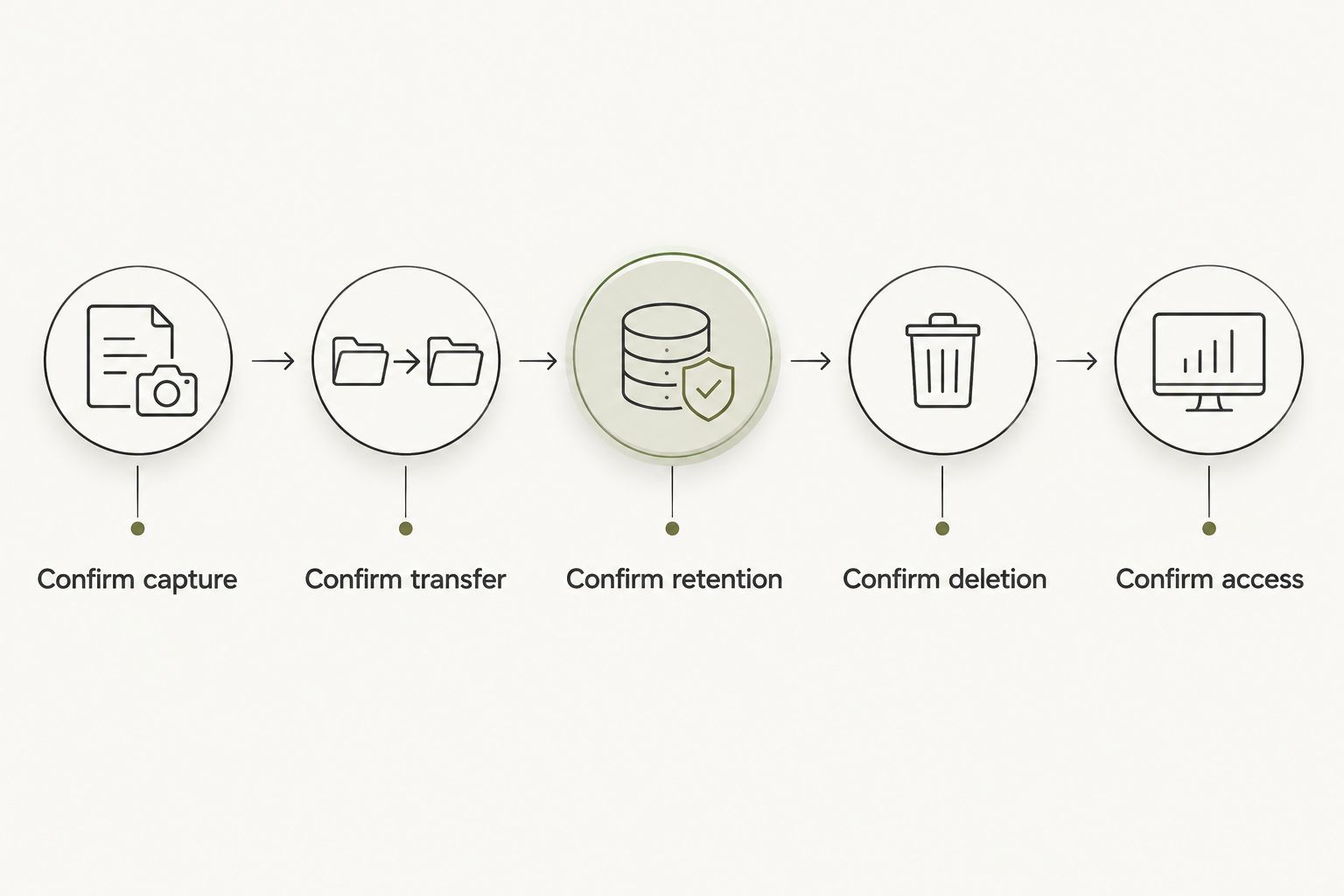
A practical answer describes what happens to a capture from beginning to end. If the explanation stops at upload, ask what happens to the original. If it stops at deletion, ask whether copies elsewhere are included.
Source records and your decisions
A captured conversation is a source record. A public source is different evidence. An inference drawn from either is an interpretation, not something you necessarily said or agreed to.
Storage should not blur those distinctions. When reviewing a saved insight, you should be able to ask what supports it: your captured words, an outside source, or an interpretation. Keeping more data does not make an inference a fact.
Your choices remain separate, too. Choose your priorities, grant each source separately, and require your yes before anything goes out in your name. Capacity is not permission.
Moonshot's stated experience turns one thing into the next step with your yes on each one. It makes no calls and moves no money. Treat that as a boundary on the experience, not as evidence of a particular storage arrangement.
Does more storage make a wearable better?
More usable storage helps when it holds material you would otherwise lose or have to remove. It does not establish recording quality, accurate transcripts, useful questions, or clear controls.
A larger capacity also gives you more to manage if you retain everything. Choose what deserves an original recording and what only needs a note. The goal is a record you can use, not a growing collection you never revisit.
For your 2026 shortlist, compare capacity only after comparing capture format and transfer behavior. Otherwise, the larger number can describe a different workload rather than a better fit.
Can a wearable work without a connection?
Offline capture depends on the product's design and available local storage. A device that records without a connection does not necessarily provide every other function offline.
Separate capture from transfer and processing. Ask what remains available while disconnected, whether pending recordings survive a restart, and how the device signals that it cannot accept another capture. Do not infer these behaviors from the word wearable.
Should you keep the original recording?
Keep an original when the wording or surrounding context matters to you. A transcript helps you reread, while a summary helps you review selected points; neither preserves everything in the recording.
For an everyday intention, a chosen next step might be the record you actually want. Say it once, review what was captured, and decide what deserves to remain. That decision belongs to you rather than to a default retention setting.
FAQ
How much storage does an AI wearable need for everyday use?
There is no universal minimum: the requirement depends on capture format, recording duration, transfer frequency, and retention. Compare usable capacity with the material the device must hold between successful transfers.
How many hours of audio fit in a gigabyte?
Recording hours per gigabyte depend on the audio data rate. Ask for the manufacturer's recording-time figure and the exact settings used to calculate it.
Is remote storage the same as storage on the wearable?
Remote storage is separate from storage on the wearable. A remote allowance does not establish how much material the device can retain before a successful transfer.
Will a wearable delete old recordings when it fills up?
Full-storage behavior depends on the product. Check whether it stops recording, replaces older material, or warns you, and whether pending transfers receive any protection.
Do transcripts use the same storage as audio recordings?
Plain-text transcripts require less data than the original audio of the same speech. Check whether the product retains both, because a transcript does not prove that the audio has been removed.
Does deleting a recording from my phone delete every copy?
Deleting a phone copy does not by itself establish that every other copy is deleted. Check the product's rules for device storage, remote storage, backups, and any exported files.
What storage specification should I check before buying in 2026?
Check usable recording capacity and full-storage behavior first. Then confirm transfer requirements, retention rules, and what remains accessible without a connection.
One last thing
Test the stopping point, not just the starting point. Before relying on a wearable for a moment you want to keep, understand how it tells you that a capture failed, storage filled, or a transfer did not finish.
A useful record starts with knowing that it exists. More gigabytes cannot replace that confirmation.


