 moonshot

Wearing an AI wearable at work is against company policy when the device or its use conflicts with your employer’s rules on electronics, recording, confidentiality, or data sharing. Permission to wear it does not automatically include permission to capture conversations or send work information to an outside service; check those activities separately before use.
- Is wearing an AI wearable at work against company policy? Check device, recording, and data rules separately.
- Permission to wear a device is not permission to record coworkers or share workplace information.
- Moonshot is for personal reflection; workplace use still requires permission.
- Ask for written approval that names the activity, information, location, and restrictions.
Why this matters
A conversation can contain information you are not authorized to share, even when you are part of it. Someone agreeing to a meeting has not necessarily agreed to a separate recording or outside processing of their words.
A personal reflection wearable such as Moonshot does not change that boundary. The useful question is not just whether you can wear something. It is what that device would capture, where the information would go, and who has approved that use.
For a workplace decision in 2026, use the current policy and an answer from the person authorized to interpret it. A coworker’s habit is not your permission.
Is wearing an AI wearable at work against company policy?
Yes, if the device or the activity breaks an applicable workplace rule. Otherwise, the answer depends on the permission your employer actually gives. A policy that allows personal electronics can still restrict recording, outside services, or use in particular areas.
Separate these situations before asking for approval:
| Activity | Best for | What permission must cover | Limitation |
|---|---|---|---|
| Wearing an inactive device | Keeping the question limited to physical presence | Personal electronics, safety, and restricted-area rules | Inactivity does not override a device ban |
| Speaking a personal reflection into a device | Talking through your own thoughts | Permitted location, capture, and any outside processing | Your reflection can still reveal work information |
| Capturing a work conversation | An explicitly approved recording purpose | Employer authorization and applicable participant requirements | Your own agreement does not settle everyone else’s rights |
| Sending captured work information to an outside service | An approved information-processing purpose | The service, information type, destination, and permitted use | Permission to record does not authorize every destination |
These are different activities, not interchangeable permission levels. Approval for one row does not approve the next.
Do not test the boundary by turning capture on during a meeting. Ask first, using a description of the intended activity rather than a broad request to use a wearable at work.
Policy checks
Start with the employee handbook, then check any separate security, recording, confidentiality, and personal-device policies. Follow references to client obligations or site-specific rules when they apply to your role.
A useful 2026 policy review answers these questions:
- Does the rule cover bringing a device into the workplace, using it, or both?
- Does it distinguish personal electronics from approved work equipment?
- Does it restrict audio capture, transcription, or outside processing?
- Does your location have additional restrictions?
- Who can approve an exception, and how must that approval be documented?
Look for activities, not just product labels. A policy does not need to name the exact device to address recording or disclosure of confidential information.
Silence is not a clear approval. When a policy does not address your intended use, ask the designated policy owner rather than filling the gap yourself.
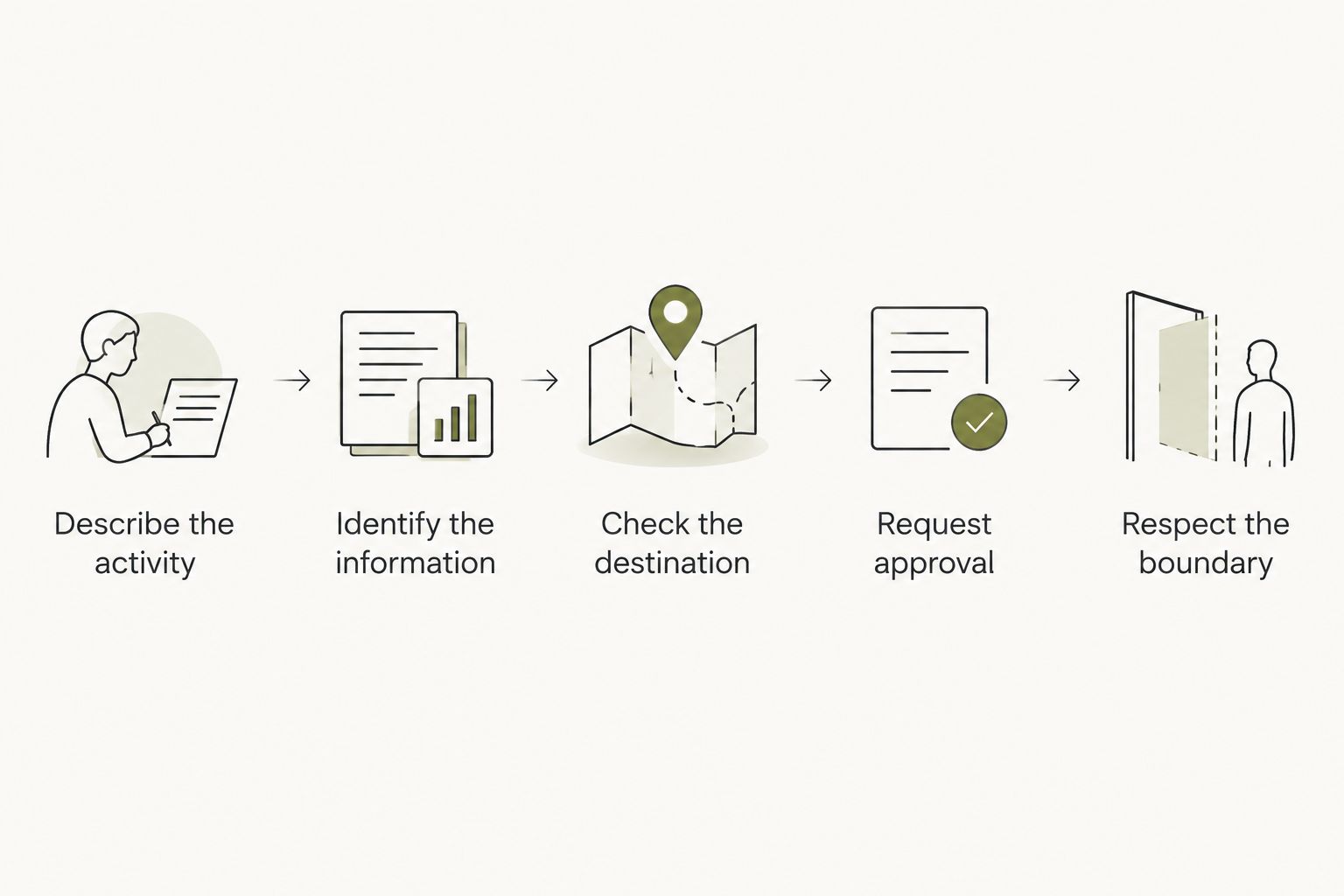
Approval steps
Describe the activity
Write down what you want to do in ordinary language. For example: talk through a personal thought during a break, without capturing a work conversation or including work information.
That is a narrower request than permission to record meetings. Keep those requests separate so an approval cannot be mistaken for something broader.
Identify the information
Name the information that could enter the device or service. Consider spoken words as well as details you repeat later, such as a customer’s name, an unreleased decision, or a colleague’s private circumstances.
Your own voice does not make every fact in the recording yours to disclose. If you cannot separate the personal reflection from restricted work information, leave that information out.
Check the destination
Find out what the intended activity requires before asking for approval. Does information stay on the device, go to a phone, or reach an outside service? Do not assume an answer from the device’s size or appearance.
Use documented product information for this check. If a relevant handling detail is unclear, do not submit work information while waiting for clarification.
Request approval
Send the request to the owner named in your policy. That could involve your manager, security team, human resources, or another designated reviewer; follow your employer’s process rather than treating any manager’s answer as sufficient.
Ask for a written response that identifies the permitted activity and its limits. A useful approval states what information is allowed, where use is allowed, and what remains prohibited.
Respect the boundary
Use the device only within the approved scope. If the meeting, location, participants, or information changes, check whether the approval still covers the activity.
For approval granted in 2026, keep the relevant policy version with the written decision. Recheck the decision when the policy or intended use changes, rather than treating an old answer as permanent permission.
Why permission varies
The same device can raise different questions in different settings. These factors explain what to include in your request, not what your employer has already decided.
- The activity. Wearing, capturing, transcribing, and sharing are separate actions. Ask about the action you intend to take.
- The information. A personal observation and a confidential work discussion require different handling. Consider what someone could learn from the content.
- The location. Check rules for the place you will use the device, including a client’s premises or a restricted work area.
- The participants. A conversation can involve coworkers, visitors, or customers. Do not assume one person can approve capture for everyone.
- The destination. An approved recording destination does not establish permission for a different service or account.
- The approving authority. An informal conversation with a colleague is different from a decision by the person responsible for the policy.
Ask for the smallest permission that fits your actual purpose. A request to reflect privately during a break should not quietly expand into capturing the surrounding room.
Recording permission and workplace approval
Workplace approval and applicable law are separate checks. An employer’s permission does not replace recording requirements, and satisfying a legal requirement does not replace the employer’s rules.
Do not use a general statement about recording law as a workplace permission slip. Ask the appropriate internal reviewer when your intended activity involves other people’s speech, especially when participants are in different locations.
For a 2026 recording decision, check current requirements for the actual setting. If you cannot establish the necessary permission, do not capture the conversation.
Also distinguish agreement from awareness. A device being visible does not tell everyone what it captures or where information goes. Explain the proposed activity through the process your employer requires, before it starts.
Public information and work conversations
A public source and a captured conversation have different origins. A published announcement is not the same thing as a colleague explaining an unpublished decision, even when both concern the same subject.
Keep the source clear when you ask for approval. Say whether information comes from a public document, your own observation, or someone’s words in a private work conversation.
Keep facts separate from interpretations, too. Someone saying a deadline changed is different from your impression that the team is worried about it. Do not turn an inference into an attributed statement.
This distinction also matters when you talk it through later. Removing a person’s name does not necessarily remove the confidential substance of what they said. Use only information you are permitted to provide.
Personal reflection at work
Moonshot is for people who want to talk it through and learn from your own life, not a substitute for workplace permission. It hears you out and asks a good question back. That purpose does not establish authorization to capture workplace conversations.
Consider a personal reflection about the friend you keep meaning to call. You can say it once, then choose the next step: make the call yourself after work. The payoff is follow-through, not a record of everyone around you.
Moonshot turns one thing into a next step, with your yes on each one. You choose your priorities and separately grant each source; nothing goes out in your name without your yes. It makes no calls and moves no money.
The boundary remains yours to respect. A personal reflection purpose does not remove the need to check workplace rules, exclude restricted information, or avoid capturing other people without the required permission.
Can my manager approve a wearable for meetings?
A manager’s approval is sufficient only when your employer gives that manager authority over the proposed use. Check whether security, recording, or information-handling approval requires another reviewer.
Ask the manager to confirm the permitted activity in writing. Permission to bring a device to a meeting is narrower than permission to capture or share the discussion.
Can I use a wearable while working from home?
Working from home does not by itself grant permission to capture work information. Apply the same policy checks to remote meetings and spoken reflections that include confidential details.
Separate personal use from work use. A private room changes the physical setting, not the origin or permitted handling of the information.
What if I already captured a work conversation?
Stop further capture and follow your employer’s incident-reporting process. Tell the designated contact what was captured, where it went, and whether it was shared.
Do not circulate the material to explain the mistake. Follow authorized instructions for access, retention, or deletion rather than deciding on a remedy yourself.
FAQ
Is wearing an AI wearable at work against company policy if it is turned off?
It is against policy if your employer prohibits the device itself in that setting. Turning it off addresses capture, but it does not override a personal-electronics or restricted-area rule.
Do I need permission before recording coworkers with a wearable?
Obtain the required workplace authorization and satisfy applicable recording requirements before capturing coworkers. Permission to wear the device does not establish permission to record.
Can I use a wearable if my company has no specific policy about it?
Ask the designated policy owner before using it for work information. Existing confidentiality, recording, and outside-service rules can address the activity without naming the device.
Is my manager’s verbal permission enough?
Do not treat verbal permission as a substitute for any required approval process. Ask for written confirmation from the person authorized to approve the specific activity.
Can I talk about work into a wearable without recording a meeting?
Only include work information you are authorized to provide to that device or service. Repeating information in your own voice does not remove confidentiality restrictions.
Does working from home change the rules for wearables?
Working from home does not automatically authorize recording or outside processing of work information. Check the rules for remote meetings and the information involved.
What should I put in a request to use a wearable at work?
Describe the activity, information, destination, location, and requested limits. Ask who must approve it and keep the written answer with the applicable policy.
One last thing
For your next workplace decision in 2026, ask about a specific use rather than a device category. A clear request describes what you want to capture, why you need it, and where it would go.
That gives the reviewer something concrete to approve or decline. It also gives you a boundary you can follow when you show up for work.


