 moonshot

Instead of manually replaying recordings and rebuilding your list, use a voice notes to to-do lists workflow that separates what you said from what you agreed to do. Capture the thought, check the meaning, and approve one clear next step before it becomes a commitment.
- A voice notes to to-do lists workflow works best when task drafts stay separate from approved commitments.
- Moonshot hears you out and asks a good question back; you choose the next step.
- Keep the original voice note so you can check names, dates, and the reason behind a task.
- Recurring thoughts deserve review, not automatic deadlines or duplicate tasks.
Why this matters
A recording preserves a thought. A to-do list asks you to act on it. Those are different jobs, and the handoff needs a decision.
Suppose you recorded, “I keep meaning to call my friend. I should ask when they’re free.” Later, that note makes the next moment useful: you can choose to ask about a time rather than add a vague task called “friend.” The recording contains the reason; the list contains the action.
The Moonshot wearable hears you out, asks a good question back, and helps you notice what your days keep saying. Moonshot is best for people who want to talk it through and choose their own next step. That does not mean handing over the decision or treating every passing thought as an instruction.
For your 2026 workflow, keep a firm boundary: a spoken possibility is not an approved task. You decide which thoughts deserve follow-through.
Before you start
- Have a deliberate recording method and a task list you can edit. You need access to your own voice notes and somewhere to keep drafts separate from accepted tasks. This guide describes a workflow, not a specific connection between products.
- Keep the source available. Save the original recording alongside any transcript or summary. If you use a captured conversation, make sure the people involved know about and agree to the capture. You choose priorities and separately grant access to each source you use.
- Watch for implied commitments. “Maybe Friday” is not a Friday deadline, and a name in a recording does not assign work to that person. Correct these assumptions before you approve anything.
You can use this process with recordings you already have. For the Moonshot wearable, keep the same approval boundary: it turns one thing into a next step, with your yes on each one. Do not treat this guide as proof of a shipped transcription, task export, or synchronization feature.
Capture setup
The capture stage gives you usable source material without requiring you to organize everything while you speak. Say it once, then leave the sorting for the review.
Recording context
- Start a deliberate recording. Capture the thought you want to revisit. Do not build the workflow around unnoticed recording or assume that everything around you is being captured.
- Include the situation. Explain what happened and why it matters. “Ask about the visit because we have not settled a day” carries more useful context than “visit.”
- Separate certainty from possibility. Say whether you have already agreed to something or are considering it. This gives your later review a clear starting point.
- Keep the original. Retain the recording when you make a transcript or summary. A shorter version helps you scan; the original helps you check.
Expected result: you have a source note that explains the thought without pretending it is already a task.
Capture boundaries
Use your own spoken reflection when that is enough. A workflow about remembering to call someone does not need access to that person’s messages, calendar, or other information.
If you bring another source into your 2026 workflow, decide separately whether to grant access. A captured conversation records what people said; a public source records published information. Neither automatically establishes what you should do next.
Keep those distinctions visible when reviewing a note. “They said they were available” is different from “I think they would be available.” Do not let a summary turn an inference into a fact.
Task draft configuration
A useful draft preserves the meaning of the recording while making the possible action easy to evaluate. Use the equivalent fields in your chosen task list; field names and controls differ between products.
Draft structure
- Separate actions from context. Pull out anything you could actually do. Leave background, observations, and open questions in the source note.
- Write a verb-led task title. Replace “friend” with “Ask my friend about a time to call.” The title should describe an action you can recognize as complete.
- Attach the reason. Keep a brief reference to the original thought in the task’s notes or description. Preserve a way to find the recording without copying every sentence into the list.
- Check the owner. Put your own actions on your list. If the next move belongs to someone else, write your action as asking, confirming, or waiting—not doing their work.
- Leave unsupported details blank. Add a deadline only when you stated or confirmed one. Check uncertain names and dates against the source rather than completing them by guesswork.
Expected result: each draft describes a possible action, retains its context, and makes uncertainty visible.
Task wording
A thought can contain several possible tasks. You do not have to accept all of them.
Consider this example: “I want to see my friend, but I haven’t asked which evening works.” The immediate action is asking about an evening. Planning the whole visit before receiving an answer adds decisions you have not made.
Use 1 action per task as a drafting rule. This is a workflow choice, not a product limit. When a task contains “and then,” check whether the second action depends on the first.
A clear completion condition also helps. “Think about the visit” has no obvious finish; “Send a question about an evening” does. The task ends when you send the question, not when the whole visit is arranged.
Draft review sequence
Use 3 review passes before accepting a draft: check the source, check the action, and check the commitment. These are separate decisions, even when you make them together.
The sequence below adds capture at the beginning and follow-through at the end:
- Capture: preserve what you meant to revisit.
- Separate: distinguish an action from context or an inference.
- Choose: decide whether the action belongs among your priorities.
- Approve: give the specific next step your yes.
- Review: check what happened and what remains.
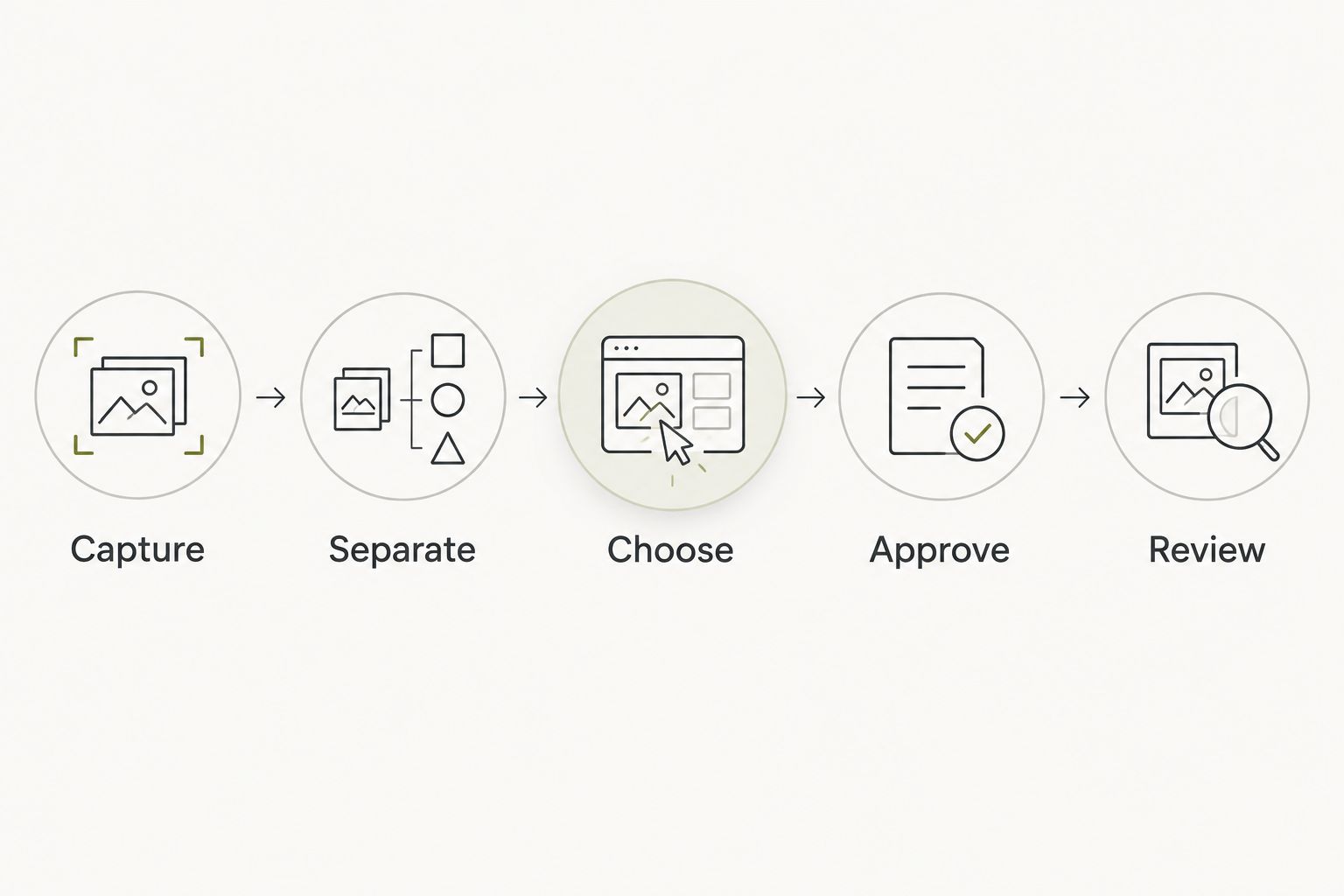
The sequence matters because a well-written task can still be the wrong commitment. Better wording does not decide whether you want to do it.
Approval configuration
Approval is where a draft becomes something you intend to do. Keep that boundary visible in your list rather than relying on memory.
Commitment review
- Read the draft beside its source. Check that it reflects what you meant, including any hesitation or condition.
- Choose the next step. Accept the action, make it smaller, defer it, or discard it. A useful recording does not have to produce a task.
- Confirm timing separately. Distinguish a firm deadline from a preferred day. If there is no timing commitment, do not manufacture one to make the list look organized.
- Move only accepted drafts into your active list. Use a separate draft area, a status, or another clear boundary your chosen system supports.
- Require approval for anything sent in your name. Accepting a task is not permission to send a message, make a call, or take another external action.
Expected result: your active list contains actions you chose, not every possibility extracted from a recording.
Keep approval specific in 2026. Saying yes to “ask about a time” is not saying yes to every later step involved in arranging a visit.
Priority choice
Decide what matters before assigning an order. An urgent-sounding recording is not enough to establish a priority; your commitments and choices do that.
If a draft feels too large, shrink the action rather than rewriting the whole goal. “Arrange the visit” becomes “Ask which evening works.” The smaller task still serves the intention without pretending the unanswered questions are settled.
Your yes belongs to the action as written. When the wording changes substantially, review the commitment again.
Follow-through configuration
An organized list should help you show up for a chosen action. It should not make the capture process the main event.
Completion review
- Open the accepted task when you are ready to act. Read the short context if you need a reminder of why you chose it.
- Do the action yourself. In the call example, you decide when to call and make the call. Moonshot makes no calls and moves no money.
- Record the actual outcome. Mark the task complete when its completion condition is met. If you sent the question and are waiting for a reply, distinguish that from arranging the visit.
- Create another task only when the outcome requires it. Do not add every imaginable follow-up in advance.
Expected result: the list shows what you did and what genuinely needs another decision.
Use a 7-day review window as a starting routine for your first week. This is a suggested review interval, not a promised product result. Look at the recordings and accepted tasks together: which thoughts became useful actions, and which were better left as thoughts?
For a 2026 first-week setup, that is enough scope. Establish the handoff before adding more sources or more automation.
Recurring-note workflow
A new note can revisit an existing intention instead of creating a new task. This second workflow is useful when you keep mentioning the same call, unfinished idea, or decision.
| Workflow | Best for | Advantage | Limitation |
|---|---|---|---|
| New task draft | A distinct action with no existing task | Gives the action a clear place for review | Creates clutter if you treat every remark as a commitment |
| Existing task review | A note that revisits the same intention | Keeps context together and avoids duplicate commitments | Needs a meaning check before you combine unrelated thoughts |
For the recurring-note workflow:
- Search your existing list for the intention before creating a draft.
- Compare the actions, not just the wording. Two notes about the same person can still describe different tasks.
- If the action is unchanged, add the new context to the existing task.
- If the new note changes the action or timing, revise the draft and approve it again.
- If the thought is no longer relevant, remove the commitment rather than carrying it indefinitely.
Expected result: repeated thoughts help you reconsider an intention without multiplying tasks.
Moonshot helps you notice what your days keep saying. That makes reflection relevant to this workflow, but it does not establish a shipped duplicate-detection or task-update integration. Keep the distinction between the product description and the process you control.
Troubleshooting
Wrong names or dates
Replay the relevant part of the recording and correct the draft before approval. If the source is unclear, leave the detail unresolved and make clarification the next step.
Everything becomes a task
Separate observations from commitments. “I enjoyed that conversation” can remain a note; it does not require a follow-up unless you choose one.
Repeated notes create duplicates
Search for an existing task before adding another. Combine context only when the intended action is the same, then keep the original sources available.
Tasks stay vague
Replace the topic with an observable action. “Birthday” becomes “Ask how they want to celebrate.” Preserve the larger intention in the notes rather than overloading the title.
Drafts appear as commitments
Keep drafts outside the active list until you approve them. If a connection cannot preserve that boundary, use it for draft collection only and handle acceptance yourself.
Workflow customization
Expand your 2026 workflow by improving one handoff at a time. If capture works but drafts are unclear, improve task wording. If drafts are clear but the list keeps growing, tighten approval rather than collecting more material.
Add another source only when it answers a specific need. Grant that source separately, and keep public information distinct from a captured conversation. More access is not a substitute for a clear decision.
Before using any connection, verify what it actually supports: draft creation, source references, updates, and approval handling. A planned capability is not a shipped one. If an essential boundary is absent, keep that part manual.
FAQ
How do I turn voice notes into a to-do list?
Capture the thought, separate actions from context, write a clear draft, and approve it before adding it to your active list. Keep the original recording so you can check uncertain details.
What is the best voice notes to to-do lists workflow?
The best workflow keeps task drafts separate from approved commitments. Preserve the source, choose a specific action, and confirm timing without inventing a deadline.
Should every voice note become a task?
No. Observations, questions, and passing possibilities can remain notes. Create a task only when you choose an action you intend to take.
Can Moonshot make the call mentioned in my note?
No. Moonshot makes no calls and moves no money. You choose the next step and carry out the call yourself.
How do I avoid duplicate tasks from repeated voice notes?
Search your existing list before creating another draft. Add context to an existing task only when the intended action is the same; changed commitments need another approval.
Should I keep the recording after making a task?
Keep the recording available for checking meaning, names, and dates. A task title summarizes an action, but it does not preserve all the context of the source.
Can I use this workflow without a task integration?
Yes. Review your voice note and enter the approved task manually in a list you can edit. A connection is useful only when it preserves the distinction between a draft and a commitment.
One last thing
Do not measure the workflow by how many tasks it creates. Open the list and ask whether you can recognize the next step you actually chose.
Start with one recording and one action. Talk it through, give it your yes, and follow through. You learn from your own life by deciding what to do with what you noticed—not by turning every thought into work.


